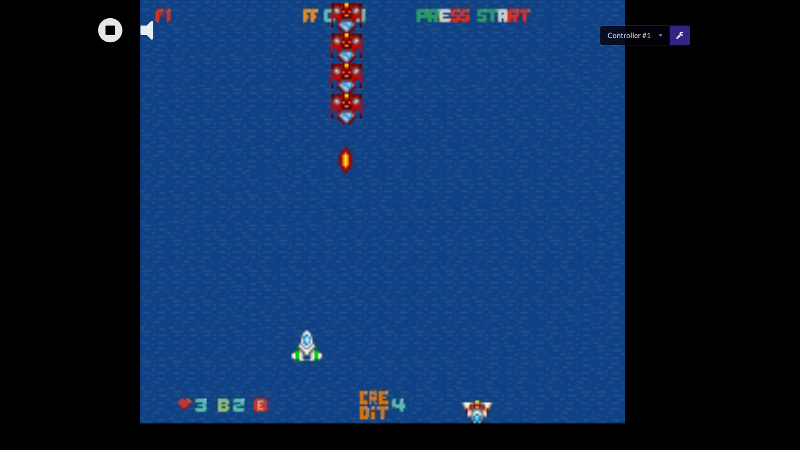
Great idea, but the performance is very poor for me. The games skip frames all the time, almost like a slideshow. I've only tested it locally, by the way.
(Windows 10, Chrome, i7-7700, GTX 1050.) What emulator did you use for this? (I would suggest using DuckStation, it's a million times faster than any other and more compatible than most of them, only Mednafen may work better in a few games.)
Replying to myself, since I bet the author won't, because they're probably violating GPL.
For anyone else interested, it definitely looks like it's using MAME, which is unfortunate, since it's one of the slowest and less accurate PSX emulators out there. In any case, I'm sure the author will soon release the source code of all the GPL parts, if any ;)
SNES party helped my partner and I get through the Covid quarantine apart from each other. I'm really happy to see efforts like this.
Hopefully the author open sources this so that the community can contribute things like a more polished UI and save state management system. Seems like the kind of project that makes sense to be open-sourced.
Jitsi is very, very impressive. But their whole platform is also bound up with a lot of other tech in the stack. (jitsi-meet, jitsi-videobridge, jicofo and 'Prosody' (XMPP).
You hint at this being a downside, but (speaking as a Prosody developer) this is one of the things that makes Jitsi extremely powerful and flexible.
For example, Jitsi delegates authentication of users to Prosody. Prosody already has a bunch of authentication backends ( https://modules.prosody.im/type_auth ) and Jitsi benefits from these without needing to reinvent the wheel. I've seen the Jitsi+Prosody combo integrated into many kinds of platforms. People also implement things like custom access control, logging, notifications and provisioning at this layer. These things would generally be harder to customize in a monolithic off-the-shelf system. Meanwhile a simple self-hosted setup is still easy enough to pull off in a spare afternoon ( https://jitsi.github.io/handbook/docs/devops-guide/devops-gu... ).
I'd say many to many is possible for more than 2 participants, but it does get complicated, being a mesh and all, so you might opt for using an SFU to untangle that mess, but it has it's own disadvantages too.
Also, aside from the obvious AV chat systems (eg: Jitsi. Zoom, etc.) 'cloud-gaming' platforms such as Google Stadia and Shadow use it. I've been monitoring and experimenting with webRTC for a few years now and one of the most exciting recent developments has been more or less full support in desktop and mobile browsers (even Safari, which dragged its heels for years)
There are a lot of use cases for WebRTC. Video calls are the biggest one right now. But anything you can imagine that needs low-latency (<200ms) video or audio is something you can potentially do with WebRTC in a browser, these days. There's a huge amount of interesting stuff going on.
WebRTC is fundamentally peer-to-peer. But scaling up to larger calls, and doing things like recording, generally requires routing the audio/video through media servers that selectively forward, process, or transcode the media streams. I cofounded a company that makes it easy to get started with and scale WebRTC-based applications and features. [0] In addition to basic video calls, we're seeing rapid growth of online classes, games, fitness applications, live collaboration in productivity apps, e-commerce and customer support, and IoT and robotics streaming video. [0] https://www.daily.co/
webrtc is great for sending data as fast as possible to someone else, unless you need to synchronise data between multiple parties
Zoom doesn't use webrtc (unless you count the browser fallback version which nobody uses), they use their own video codec - which notably uses a lot of cpu but requires little bandwidth.
From my experience, zoom is the only solution where I don't experience bandwidth problems all the times.
Not at the moment, he's moved on from it and is now working on making a GBA version of a DDR-like game, but you can try approaching him, check his website out https://r-labs.io/
Comments (171) 33 threads
Earlier comments(Windows 10, Chrome, i7-7700, GTX 1050.)
What emulator did you use for this? (I would suggest using DuckStation, it's a million times faster than any other and more compatible than most of them, only Mednafen may work better in a few games.)
For anyone else interested, it definitely looks like it's using MAME, which is unfortunate, since it's one of the slowest and less accurate PSX emulators out there.
In any case, I'm sure the author will soon release the source code of all the GPL parts, if any ;)
[0]https://archive.org/details/psxgames
Hopefully the author open sources this so that the community can contribute things like a more polished UI and save state management system. Seems like the kind of project that makes sense to be open-sourced.
Yes and it works well
For example, Jitsi delegates authentication of users to Prosody. Prosody already has a bunch of authentication backends ( https://modules.prosody.im/type_auth ) and Jitsi benefits from these without needing to reinvent the wheel.
I've seen the Jitsi+Prosody combo integrated into many kinds of platforms. People also implement things like custom access control, logging, notifications and provisioning at this layer. These things would generally be harder to customize in a monolithic off-the-shelf system.
Meanwhile a simple self-hosted setup is still easy enough to pull off in a spare afternoon ( https://jitsi.github.io/handbook/docs/devops-guide/devops-gu... ).
Continue this thread — 2 replies
- https://mediasoup.org
Fwiw, WebRTC doesn't imply p2p/serverless.
Also, aside from the obvious AV chat systems (eg: Jitsi. Zoom, etc.) 'cloud-gaming' platforms such as Google Stadia and Shadow use it.
I've been monitoring and experimenting with webRTC for a few years now and one of the most exciting recent developments has been more or less full support in desktop and mobile browsers (even Safari, which dragged its heels for years)
WebRTC is fundamentally peer-to-peer. But scaling up to larger calls, and doing things like recording, generally requires routing the audio/video through media servers that selectively forward, process, or transcode the media streams.
I cofounded a company that makes it easy to get started with and scale WebRTC-based applications and features. [0] In addition to basic video calls, we're seeing rapid growth of online classes, games, fitness applications, live collaboration in productivity apps, e-commerce and customer support, and IoT and robotics streaming video.
[0] https://www.daily.co/
Zoom doesn't use webrtc (unless you count the browser fallback version which nobody uses), they use their own video codec - which notably uses a lot of cpu but requires little bandwidth. From my experience, zoom is the only solution where I don't experience bandwidth problems all the times.
[1] https://rodri042.github.io/nestation
All comments shown.
Couldn't load more comments. Check your connection and try again.