Show HN: I made a free animator. Think Adobe Illustrator but for animation (opens in a new tab)trangram.com
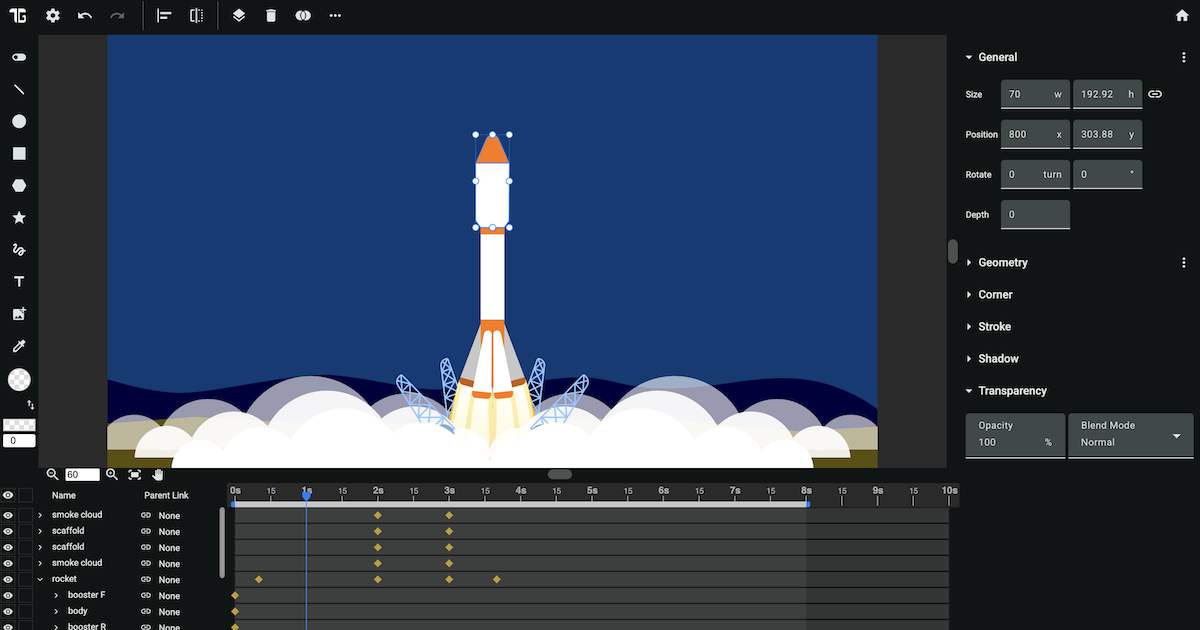
738 pointsTrangram is a free one-stop platform to create, and share motion graphics and svg animations with a free built-in powerful editor which is a fusion of Adobe Illustrator and animation tools.
Comments (247) 73 threads
Earlier commentsSpeaking as a non-professional JS programmer, where can I read about how to architect a program like this where you select a tool, then that tool lets you draw (or do something) on canvas. Another tool, has a different behavior to mouse click/movement while initial placement and later editing of the nodes. Architect it in such a way that its not a long list of if statements for state management.
The recently shared Eloquent Javascript[0] had chapter 19 making a pixel editor. That seems to be a good approach, but then I wouldn't know any better. Any recommended reading or small size sourcecode that one could read and learn?
[0] https://eloquentjavascript.net/19_paint.html
You'd need to build all of that functionality yourself. You detect where the user is pointing/clicking, then draw the element they are creating as visual feedback, then once done, persist the element somewhere.
If a user clicks on the element again, somehow display that it is selected and display the tools for editing.
You could build it in vanilla JS, or use a framework like React.
I think fabric.js is worth checking as its source code is well organized and documented. It's not a small project though and the latest version was rewritten in TypeScript: https://github.com/fabricjs/fabric.js/tree/master
The live version is at https://tldraw.com
> Speaking as a non-professional JS programmer, where can I read about how to architect a program like this where you select a tool, then that tool lets you draw (or do something) on canvas.
I've not got any sources for you, but I think the EJ chapter makes the key point that however you architect the project, you really, really need to keep as much of your user interface as possible in HTML/CSS, if only for accessibility. When it comes to manipulating graphical objects already added to the canvas, I'm not a great fan of the "box controls" approach (for controlling width, height, scaling, rotation) - which a lot of canvas libraries seem to include - because I can't think of an efficient/elegant way to make those controls accessible.[2]
The other big issue is keeping track of state, and possibly state history if you want undo/redo functionality. For this you really need to think of building on top of an existing canvas library - many will make state management a lot easier to handle, leaving you more time to build out the interesting stuff. There's a lot of excellent libraries out in the wild for you to choose from[3].
Or you could build your own canvas library. I've had lots of (at times frustrating) fun over the past 10 years doing just that. Highly recommended!
[1] - http://paperjs.org/
[2] - My proof-of-concept attempt for an alternative approach to controls. Sadly not very pretty: https://scrawl-v8.rikweb.org.uk/demo/modules-005.html
[3] - https://benchmarks.slaylines.io/
Some small suggestions:
- Please add some keyboard shortcuts for common actions, i.e., cmd/ctrl + z to undo (+ shift to redo), delete/backspace to delete, cmd/ctrl + d to duplicate, cmd/ctrl + a to select all.
- Increase rotate cursor affordance - it's currently relatively tiny.
I think just re-designing the landing page would make a huge difference, very quickly. I think currently it lets down what is a well-crafted design / animation tool. Get rid of the white and teal, and the default system fonts. The looom site is a lovely example (https://www.iorama.studio/looom).
By the way, your "Features" page is really well made. I would showcase those features on the homepage. I didn't find the list of features until I clicked the link in one of your comments on HN.
You can also make your project more appealing on the homepage by including a looping demo animation (to see what's possible) and a screenshot of the tool.
Best of luck with the project!
All comments shown.
Couldn't load more comments. Check your connection and try again.