Show HN: iFixit created a new USB-C, repairable soldering system (opens in a new tab)hackaday.com
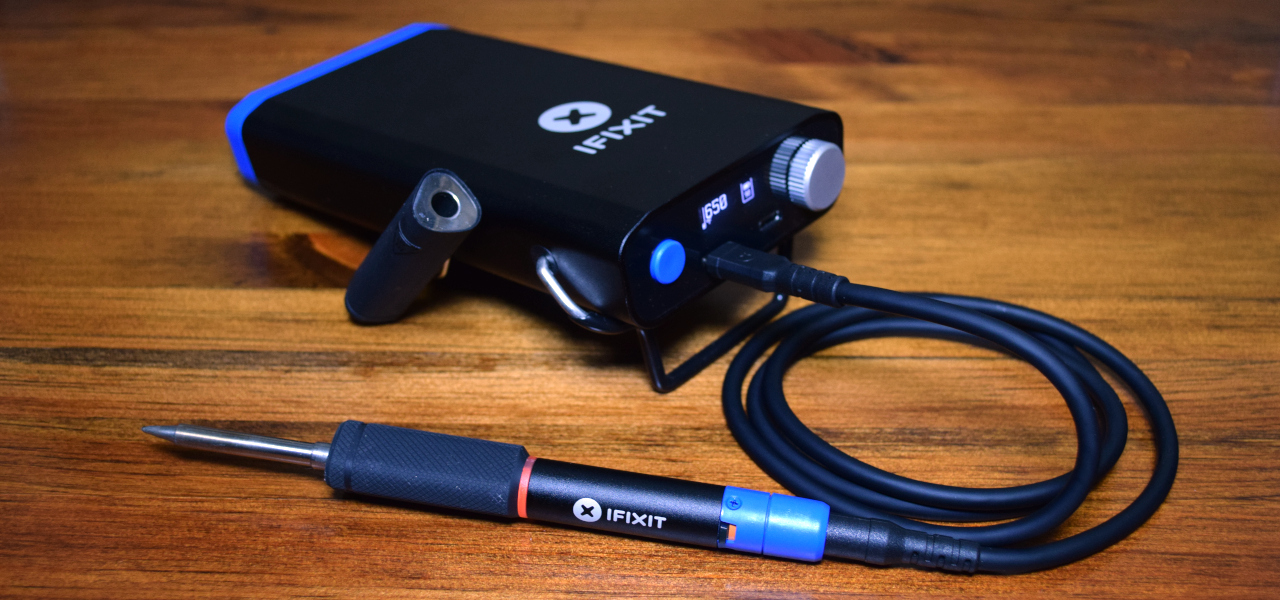
928 pointsIt's a USB-C powered soldering iron and smart battery power hub. Super repairable, of course. Our goal is to make soldering so easy everyone can do it:
https://www.ifixit.com/fixhub
We didn’t want to make just another iron, so we spent years sweating the details and crafting something that met our exacting standards. This is a high-performance iron: it can output 100W of heat, gets to soldering temperature in under 5 seconds, and automatically cools off when you set it down. The accelerometer detects when you pick it up and heats it back up. Keeping the iron at a lower temperature while you’re not soldering shouold prolong the life of the tip.
What’s the difference between this iron and other USB-C irons on the market? Here’s a quick list:
Higher power (our Smart Iron is 100W, competitors max out at 60W over USB-C, 88W over DC Supply)
Heat-resistant storage cap (you just have to try this out, it’s a real game changer in day-to-day use)
Polished user experience
A warranty and a local company to talk to (I can’t find any contact information for Miniware)
Comfier / more natural grip
Shorter soldering tip length
No-tangle, heat-resistant cable
Locking ring on the cable, so it can’t snag and get disconnected (this happens to me all the time on other irons)
More intuitive settings, either on the Power Station or on the computer
We used Web Serial https://caniuse.com/web-serial for the interface, which is only supported in Chromium browsers. The biggest bummer with that is that no mobile browsers support it, yet. Hopefully that changes soon.
Hardware is hard! It's been a journey for us. Happy to answer any questions about how we made it.
Schematics and repair information are online here: https://www.ifixit.com/Device/FixHub_Portable_Soldering_Stat...
Comments (405) 75 threads
Earlier commentsafter a few days trying to turn that into a daily driver however, i've had to go back to my weller desktop station, for one weird reason: i dont have anywhere to put the hot iron in between uses!
i dont know if it's just me, but my work cadence involves me using my soldering iron about 30-40 times over the course of an hour or so, for about 3-4 seconds each time. sometimes i'm soldering a row of headers, or just one or two joints, but then theres 3-4 minutes where i'm moving wires around or programming something quickly, and i dont want to wait for the tip to cool each time so i can set it somewhere and work on the board a bit, if I can just leave it in a safe place while hot, which my weller always had.
I got one of those bent sheet metal desktop 'holders', but the iron is so light compared to the cable, there's no way it's not falling off the table at some point.
I had one of these pencil soldering irons as I needed to solder something at a location. Once I powered it on, I was like oh snap, where do I put this thing now. Very much noped out and got the thing home where I could solder it properly with proper tools.
1: https://github.com/Ralim/IronOS
Just pick one out out that you like and get it coming your way.
For portable use, I got some snap-on purpose-built "legs" made from steel wire from aliexpress the other day that let me put the Pinecil down safely on a flat surface. They work a treat.
(And for bench use, stick a magnet to the collar of the stand. Pinecil V2 has a Hall effect sensor built in (and one can be added to V1) that will detect when the iron is in the stand, so IronOS will enter a selectable lower-temperature sleep mode right away. It heats back up quick enough that it's unlikely to ever get in the way.)
Our cap is just a game changer there. You handle it more like a Sharpie than a soldering iron. Put the cap on and stick it back in your bag. https://pbs.twimg.com/media/GXR8kMVbgAEeRgd?format=jpg&name=...
I set the motion timer on mine to 5 seconds. It heats up so quickly when you pick it back up that there's no reason to bother with the power switch. By the time I have it back at the joint, it's at temperature ready to go.
I’m also worried about burning myself if I’m not paying attention when putting the cap on 20 or 30 times in succession.
https://fanttik.com/products/fanttik-t1-max-soldering-iron-k...
1: https://pine64.com/product/pinecil-smart-mini-portable-solde...
2: https://wiki.pine64.org/wiki/Pinecil_Firmware
Honestly, I've never been that interested in the Pinecil. It's nice that it's small but you still need a big type C supply. I could give a rats ass that it has open firmware and runs a RISC-V. I only care if it can push a lot of heat accurately and if the tips are affordable and available. Anything else does little to sway me.
My solder station at work is an incredibly dumb Metcal that only has a power switch. Heat is controlled by the tips you use. When you pull it from the iron rest, it turns on instantly. Put it back and it turns off. The handle is just a plug for the tip, all the power electronics are in the base unit. It's got two plugs so you can run dual irons for microsoldering or if you just want a big chisel tip at the ready.
The amount of technology in a Metcal to make it work as well as it does, justifying its $1,000 sticker price back when I did that kind of stuff, makes it far from dumb! The rest of the market has caught up, but back when it was released, Metcals were highly sought after! It does this induction heating thing with the Curie point which makes for a very good soldering iron.
Definitely not beatable in value/price.
https://www.tomshardware.com/reviews/miniware-ts1c
Why hellishly-complex USB-C with its effete tiny-pinned connectors instead of a plain old robust barrel jack? And requiring software instead of a simple analog feedback loop? Software which could fail and cause runaway heating is never a good idea.
Soldering irons have always been quite repairable, especially the simple ones:
https://320volt.com/wp-content/uploads/2015/02/yihua-hakko-9...
https://www.next.gr/uploads/79/lm358_simple.png
I guess that’s the inexorable trend in tech—add more and more shim layers between problems we’re not allowed or too lazy to fix.
Is that the case, or did I misunderstand?
With 100 Watts of power and an ultra-fast response time, you can flow the joules that you actually need into the material at the temperature you set.
Give it a try! If you still feel like you need a temperature knob, we'll refund your purchase.
https://www.youtube.com/watch?v=30LOTlQ3Cc8
All comments shown.
Couldn't load more comments. Check your connection and try again.