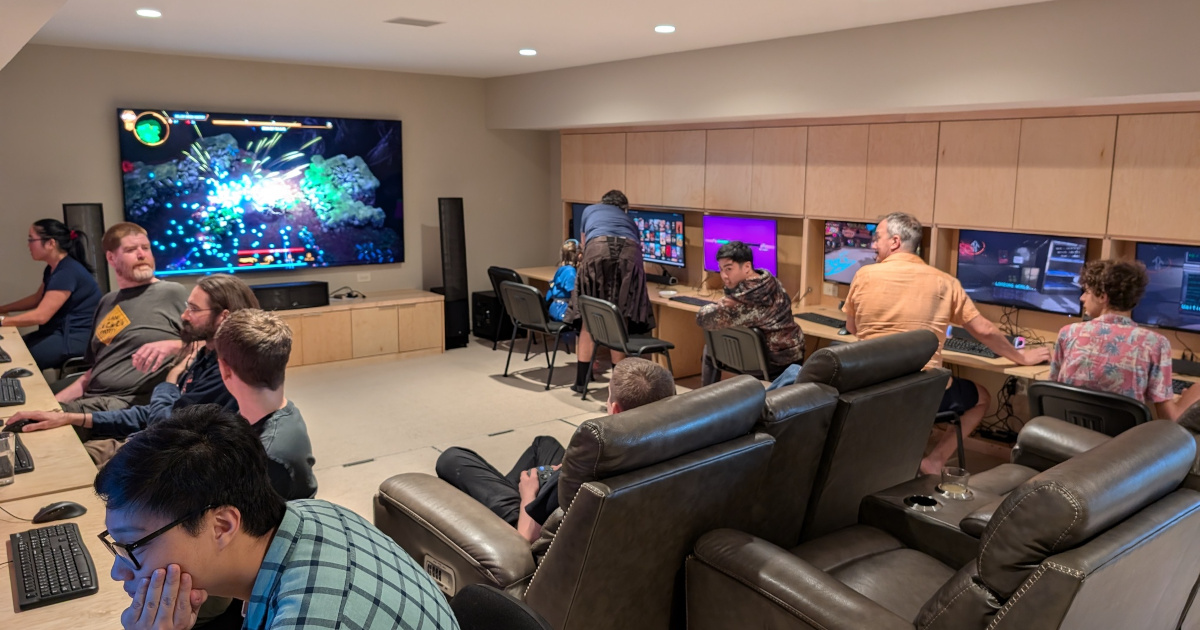
Show HN: I built a(nother) house optimized for LAN parties (opens in a new tab)lanparty.house
1117 pointsI wasn't quite sure if this qualified as "Show HN" given you can't really download it and try it out. However, dang said[0]:
> If it's hardware or something that's not so easy to try out over the internet, find a different way to show how it actually works—a video, for example, or a detailed post with photos.
Hopefully I did that?
Additionally, I've put code and a detailed guide for the netboot computer management setup on GitHub:
https://github.com/kentonv/lanparty
Anyway, if this shouldn't have been Show HN, I apologize!
[0] https://news.ycombinator.com/item?id=22336638
Comments (381) 102 threads
But, in fact, some friends who regularly attended LAN parties in the Bay Area moved to Austin around the same time we did. And some others are also willing to travel for New Year's.
(Most parties are just local people, of course.)
I'm in a completely different part of the world, but for similar reasons I ended up with a few friends in tech who moved to the same part of the world - and I've also met similar profiles to ours, attracted by the same reasons.
I think the lack of any standing offerings of variations of Quake is a glaring mistake but easily rectified. :)
It's really heartening to see lan gaming continued and offered in such a way that the amount of hassle and setup is minimized and the gaming is maximized. We spent far too much time in the 90's and 2000's dealing with driver issues, etc etc. Bravo.
New ways to exploit the physics to do things your opponents don't expect and can't easily reproduce. As the skill level of regular players increases, I always look for new ways to approach the maps.
Continue this thread — 3 replies
Continue this thread — 2 replies
There was always someone who would just be totally unable to connect with someone else.
Continue this thread — 2 replies
It is amazing to think how much IPv4 and IPv6 "just work" in comparison.
That said my first LAN party was 1996 and we were running Windows 95 by that point, which probably helped.
The tabletops also seems a bit too thin and wiggly for my taste, but, honestly, for LAN parties with chill people you personally know — it's ok
As for the actual host setup with a singular disk image — great job! LAN gaming centres do something similar with their setups, with some differences (a lot of centres either use Windows-based diskless solutions that mount vhdx files as drives remotely over iSCSI, or use ZFS-based snapshotting, which is my personal favourite)
But all in all, seems like my dream house :)
I own a chain of LAN gaming centres, so the feedback is definitely skewered into the business perspective quite a bit
I ended up putting together my own thing. I saw various products that seemed like they might be what I wanted but they always seemed... sketchy.
CCBoot is a Windows Server-based diskless solution I mentioned, and they also provide CCDisk, which can do "hybrid" mode — where there is a small SSD in every PC with base OS pre-installed and pre-configured, which then mounts an iSCSI game drive
GGRock is a fantastic product, in my opinion. It is pricy, but where as CCBoot relies heavily on knowing it's inner workings, GGRock is pretty much turnkey solution
There is also CCu Cloud Update, which I have heard of, but didn't try myself, since they sell licenses only in Asia, from what I remember
LANGAME Premium is an addon for LAN centre ERP system, which is basically an ITAAS solution based on TrueNAS. Of all paid offerings that one is my favourite so far — but you have to use their ERP and actually run a business for it to be cost-effective
NetX provides an all-in-one (router, traffic filter and iSCSI target) NUC-like server with pre-configured software on a subscription basis. I am most skeptical of that just on the basis that, from my research, two NVMe drives can't really handle the load from a fully occupied 40+ machines LAN centre. Not for a long time, at least
...and homebrew, of course. I myself am running a homebrew ZFS-based system which I'm extremely happy with
In your case, I'd go with building my own thing too. Does not take a lot of time if you know the inner workings and you have no additional OPEX for your room :)
For one, if you get a bunch of nerds together a sizable fraction are likely to have sensory issues- and won’t come again if you don’t make it welcoming for them
Some video games require some sound as it shares information, but can usually be configured to only have those sounds, or to turn on an accessible visual indicator
Each computer has a sound bar and everyone just uses that. Yeah, that means everyone's sound gets mixed up and you don't get positional audio, but in practice it's fine and we'd rather be able to yell at each other.
That might or might not be due to the games we've mostly been playing on our LAN parties are coming from a bit different profile than "chill co-op" — more MOBAs or tactical / arena shooters. In those styles of games visual cues don't really help and not having the clear audio puts you at a disadvantage
The music is still playing in the background, though — the headsets are not 100% soundproof and you may still easily communicate via VoIP
Yeah, the "live talking" aspect without headsets isn't there, but I've found it doesn't bother me in the slightest. You still are in the same room, you get the "shoulder sense" of your team there, you still celebrate and have fun as one and lose as one singular organism, and that's the feeling I've kinda been chasing on my LAN parties and in my LAN centre
I never had the tenacity to consider my build "finished," and definitely didn't have your budget, but I built a 5-player room[1] for DotA 2 back in 2013.
I got really lucky with hardware selection and ended up fighting with various bugs over the years... diagnosing a broken video card was an exercise in frustration because the virtualization layer made BSODs impossible to see.
I went with local disk-per-VM because latency matters more than throughput, and I'd been doing iSCSI boot for such a long time that I was intimately familiar with the downsides.
I love your setup (thanks for taking the time to share this BTW) and would love to know if you ever get the local CoW working.
My only tech-related comment is that I will also confirm that those 10G cards are indeed trash, and would humbly suggest an Intel-based eBay special. You could still load iPXE (I assume you're using it) from the onboard NIC, continue using it for WoL, but shift the netboot over to the add-in card via a script, and probably get better stability and performance.
[1]: https://imgur.com/a/4x4-four-desktops-one-system-kWyH4
Yeah I'm pretty sure my onboard 10G Marvell AQtion ethernet is the source of most of my stability woes. About half the time any of these machines boot up, Windows bluescreens within the first couple minutes, and I think it has something to do with the iSCSI service crashing. Never had trouble in the old house where the machines had 1G network -- but load times were painful.
Luckily if the machines don't crash in the first couple minutes, then they settle down and work fine...
Yeah I could get higher-quality 10G cards and put them in all the machines but they seem expensive...
If you make a decision on a 10G card (SFP or ethernet) I'd like to hear what you picked.
Continue this thread — 1 reply
10gbase-t ethernet is harder to pick, a lot of those cards run incredibly hot particularly the ones that expect server style cooling. Heard bad things about all of them.
Also heard that Windows has a hard time reaching 10G anyway.
Continue this thread — 1 reply
Bulk buying is probably hard, but ex-enterprise Intel 10G on eBay tends to be pretty inexpensive. Dual spf+ x520 cards are regularly available for $10. Dual 10g-base-t x540 cards run a bit more, with more variance, $15-$25. No 2.5/5Gb support, but my 10g network equipment can't do those speeds either, so no big deal. These are almost all x8 cards, so you need a slot that can accomidate them, but x4 electrical should be fine (I've seen reports that some enterprise gear has trouble working properly in x1/x4 slots beyond bandwidth restrictions which shouldn't be a problem; if a dual port card needs x8 and you only have x4 and only use a single port, that should be fine)
I think all of mine can pxeboot, but sometimes you have to fiddle with the eeprom tools, and they might be legacy only, no uefi pxe, but that's fine for me.
And you usually have to be ok with running them with no brackets, cause they usually come with low profile brackets only.
Continue this thread — 3 replies
Continue this thread — 7 more replies
All comments shown.
Couldn't load more comments. Check your connection and try again.