Show HN: Micasa – track your house from the terminal (opens in a new tab)micasa.dev
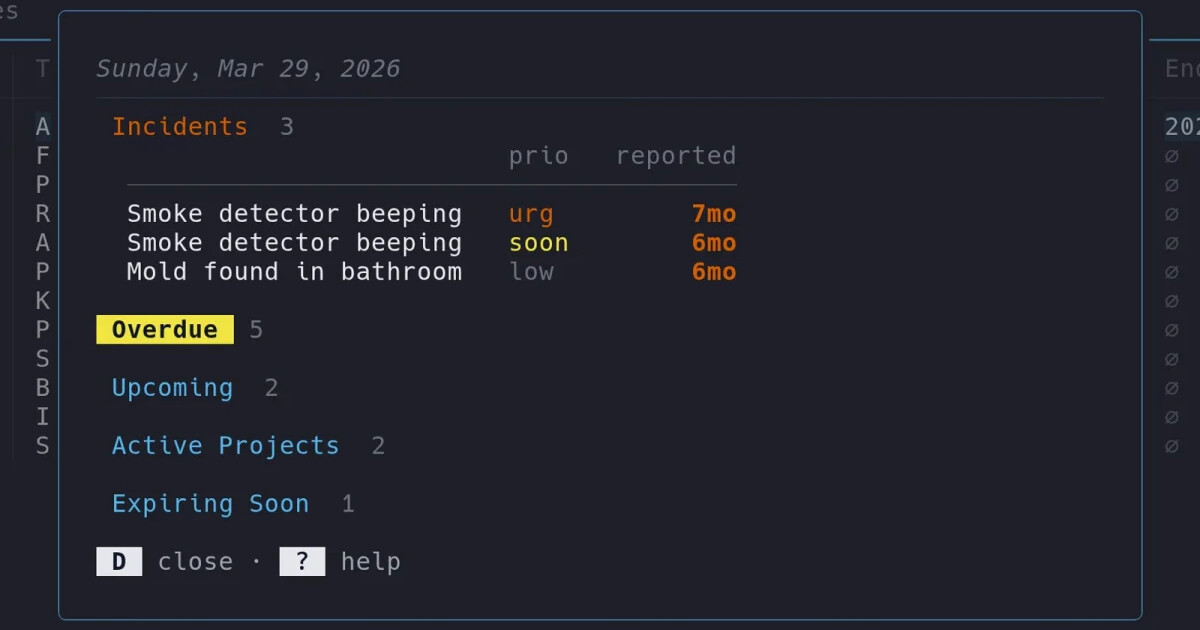
657 pointsI built it because I was tired of losing track of everything in notes apps, and "I'll remember
that"s. When do I need to clean the dishwasher filter? What's the best quote for a complete
overhaul of the backyard. Oops, found some mold behind the trim, need to address that ASAP. That
sort of stuff.
Another reason I made micasa was to build a (hopefully useful) low-stakes personal project where
the code was written entirely by AI. I still review the code and click the merge button, but 99%
of the programming was done with an agent.
Here are some things I think make it worth checking out:
- Vim-style modal UI. Nav mode to browse, edit mode to change. Multicolumn sort, fuzzy-jump to
columns, pin-and-filter rows, hide columns you don't need, drill into related records (like
quotes for a project). Much of the spirit of the design and some of the actual design choices
is and are inspired by VisiData. You should check that out too.
- Local LLM chat. Definitely a gimmick, but I am trying preempt "Yeah, but does it AI?"-style
conversations. This is an optional feature and you can simply pretend it doesn't exist. All
features work without it.
- Single-file SQLite-based architecture. Document attachments (manuals, receipts, photos) are
stored as BLOBs in the same SQLite database. One file is the whole app state. If you think
this won't scale, you're right. It's pretty damn easy to work with though.
- Pure Go, zero CGO. Built on Charmbracelet for the TUI and GORM + go-sqlite for the database.
Charm makes pretty nice TUIs, and this was my first time using it.
Try it with sample data:
go install github.com/cpcloud/micasa/cmd/micasa@latest && micasa --demo
If you're insane you can also run micasa --demo --years 1000 to generate 1000 years worth of
demo data. Not sure what house would last that long, but hey, you do you.
Comments (218) 83 threads
Most SaaS companies are just that: 1) Curated domain model (stored in their cloud db) 2) Some way for users do to almost raw CRUD on the tables 3) Curated high-level domain specific workflows that do n CRUD calls underneath
So many of these SaaS apps could have been a simple Excel / domain model template like Micasa.
But it seems like we haven't "cracked" the perfect UI on top of relational DBs.
Excel: Good: raw CRUD. Bad: too many degrees of freedom + the possibility to edit the domain model itself. That's too much for most users.
TUI: Good: raw CRUD with some guardrails, limited possibility to adjust the domain model / not by accident. Keyboard shortcuts, for professionals. Bad: inaccessible for non-tech end users + hard to build good UX for high-level domain specific workflows.
Full Web UI: Good: accessible for all. Great for high-level domain-specific workflows. Bad: looks and works different every time. Raw CRUD possible, but always a compromise with editable data grid libraries.
I've never liked them, never learned to work with them, and instead spent 20 years learning to program and make my own db-backed crud interfaces.
Your points are spot on. But I'd like to defend a sliver of my stubbornness about it all; a product built for a specific use or domain exports the _education_ and information architecture of that domain. Sure it's all rows and columns in a db, and a spreadsheet is just that exposed to the user, but a "product" and its creator/company gets to design and prescribe a learning experience. And I think that's the magic and the value. That's what I'm holding onto!
Continue this thread — 2 replies
Microsoft Access was strictly file based. You could drop the .mdb/.accdb file on a SMB share and it would support basic concurrency via lock files. However, you could also swap out the internal database engine (Jet) with anything else via ODBC, so your Access database could connect to a remote Microsoft SQL Server instance - or even MySQL/Postgres.
Back in high school, I even wired up an Access database to give a graphical frontend to an accounting app running on an IBM AS/400 mainframe. ODBC made it easy, and Access itself didn't really care where the data lived.
I should probably give it a shot.
I'm not a Notion booster, and I know there are many other solutions with similar tools/features.
But I'd argue that Notion databases are a very good balance of all of these things. It can be raw CRUD if you want it to be, but it's easy to create custom views that accomplish often exactly what you need.
Not exactly sure what you mean by "looks and works different every time" w.r.t. web apps.
In my experience this is a good example of where the UX details matter significantly. Yes, Airtable exists. But a Notion database row being its own first-class "Page" is a *massive* deal for me. (Again: I'm aware Notion is not the only thing)
Not the parent but I take it to mean _across_ web-apps from various services the UI looks and works differently, vs every spreadsheet is a spreadsheet and works like a spreadsheet.
I have always thought that it was a missed opportunity that we'd never reused it nor turned it into any sort of SaaS. It seems to me like such an obvious and easy way to let your clients define their own business logic without having to maintain it yourself.
1. https://news.ycombinator.com/item?id=20793043
So the answer is native app - I think what the world need is a super fast native spreadsheet that is NOT Excel. Kinda like a combination of Excel, TUI, and MS Access in one. Fast like Numbers.app, not sluggish like Excel is.
I'd use that. But it needs to have a keyboard centric operation, and be faster and a very solid, near industrial design, no "the latest flavor of someone's Figma design". I'm having a tough time explaining this.
What do you guys think?
I’m using Google Sheets for house and cars. Columns that should be easily grouped are using data validation and yes - few times deep into the experiment (because I’m sometimes lazy and miss some data - so experiment is good name) I’ve changed domain a little by adding columns. It meant empty values for existing rows - that I couldn’t fill in most cases, because a lot of time passed.
Reading many comments here I think we will create multiple frameworks/standards like always and some tools will be missing things others have :(
Funny thing is sheets works good and with scripts I can (still for free in terms of money) send notifications to selected channels or do some automated actions (like check disks status or order something automatically)
Edit: sheets have sync across devices too. Single SQLite for this specific case, having less nerdy people at home is an disadvantage.
There's no reason you can't jam a TUI into a browser. Perhaps to the surprise of both kinds of user, but it's possible.
> I think what the world need is a super fast native spreadsheet that is NOT Excel.
> I'd use that. But it needs to have a keyboard centric operation
You should boot up an emulator and check out the OG: Lotus 1-2-3. Keyboard driven, extremely fast, all written in 16-bit assembler for the original IBM PC running at, what, 4MHz?
It's because of Lotus 1-2-3's use of F2 for "edit cell" that F2 is still "edit" or "rename" in most applications.
(you can then continue the tour with WordPerfect and Borland Turbo Pascal, if you like light blue)
Amusingly most of this data then end up back into Excel or PowerBi but the unbundling and contextualizing itself is worth the price.
Semantic mapping was the answer all along. It just failed on the open web. The idea never died in the industrial world.
Users don't care whether a product is "just crud" or not. The value comes from what the spreadsheet-like model looks like, and how it and its associated crud operators map onto the real world, helping a real human being to get things done. It's never about "the technology".
Many developers dislike this fact about the world because they are more interested in technology than solving people's problems.
Developing that well-working model and ux takes time and effort. Without an associated business model you cannot spend thousands of man hours to do that. Hence software tend to be for-profit saas, and not open source TUI apps.
Many developers dislike this fact about the world because they wish they could work on technology and not have to care about economic reality.
"I’ve been using the demo data for three weeks. I don’t own a house. — Aspiring Homeowner"
On a cost basis, it no longer makes sense--practically--not to use visual/text/audio intelligence to manage such a large asset. We just don't have the user-friendly mass-market interfaces for it just yet.
It's possible to scan every manual, every insurance policy, ingest every local bylaw. It's possible to take a video of your home and transform it into a semantically segmented Gsplat of [nearly] everything you own. It's possible to do sensor fusion of all the outward facing cameras from your home. And obviously agents like OpenClaw can decide what to do with all of this (inventory, security, optimization, etc).
Is that legal though? I'm guessing it the US it might be, given the amount of cameras of public places you can see in various communities, but wonder how common that is. Where I live (Spain) it's not legal to just stick a camera on your house and record public places, you need to put the camera in a way so you're only filming your private property or similar.
Not a legal expert just what I’ve heard.
That's legal.
If someone gets recorded that's because they left the public land and entered mine.
That makes sense, you're not actually recording public spaces, that'd be legal here too. "all the outward facing cameras from your home" makes it sound like that's including public spaces though, but maybe I'm just reading it too strictly.
Continue this thread — 1 reply
Bricks are there (Home assistant, Frigate, Pihole,...)
There's also the inherit struggle of being everything for everyone with an app like this, and focusing on features 80% of your users want and leaving the other 20% niche features on the backlog upsets people, mostly the power users.
Continue this thread — 8 replies
Continue this thread — 3 more replies
Continue this thread — 3 replies
All comments shown.
Couldn't load more comments. Check your connection and try again.