Show HN: boringBar – a taskbar-style dock replacement for macOS (opens in a new tab)boringbar.app
520 pointsI recently switched from a Fedora/GNOME laptop to a MacBook Air. My old setup served me well as a portable workstation, but I’ve started traveling more while working remotely and needed something with similar performance but better battery life. The main thing I missed was a simple taskbar that shows the windows in the current workspace instead of a Dock that mixes everything together.
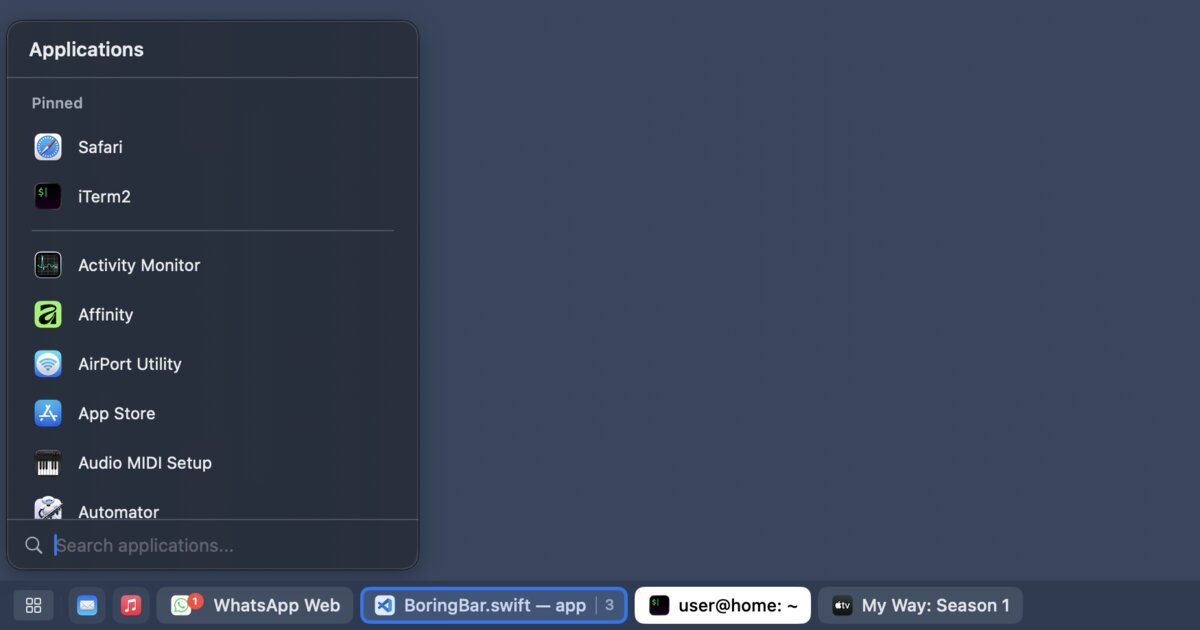
I built boringBar so I would not have to use the Dock. It shows only the windows in the current Space, lets you switch Spaces by scrolling on the bar, and adds a desktop switcher so you can jump directly to any Space. You can also hide the system Dock, pin apps, preview windows with thumbnails, and launch apps from a searchable menu (I keep Spotlight disabled because for some reason it uses a lot of system resources on my machine).
I’ve been dogfooding it for a few months now, and it finally felt polished enough to share.
It’s for people who like macOS but want window management to feel a bit more like GNOME, Windows, or a traditional taskbar. It’s also for people like me who wanted an easier transition to macOS, especially now that Windows feels increasingly user-hostile.
I’d love feedback on the UX, bugs, and whether this solves the same Dock/Spaces pain for anyone else.
P.S. It might also appeal to people who feel nostalgic for the GNOME 2 desktop of yore. I started my Linux journey with it, and boringBar brings back some of that feeling for me.
Comments (308) 131 threads
Earlier commentsGood luck!
All comments shown.
Couldn't load more comments. Check your connection and try again.