Show HN: boringBar – a taskbar-style dock replacement for macOS (opens in a new tab)boringbar.app
520 pointsI recently switched from a Fedora/GNOME laptop to a MacBook Air. My old setup served me well as a portable workstation, but I’ve started traveling more while working remotely and needed something with similar performance but better battery life. The main thing I missed was a simple taskbar that shows the windows in the current workspace instead of a Dock that mixes everything together.
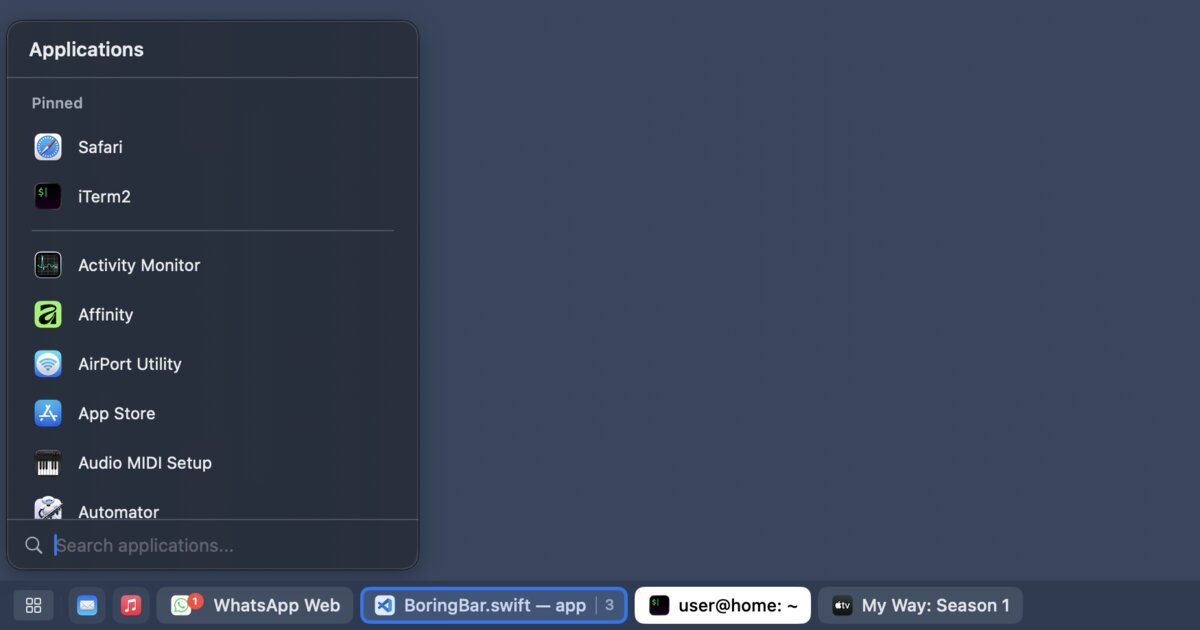
I built boringBar so I would not have to use the Dock. It shows only the windows in the current Space, lets you switch Spaces by scrolling on the bar, and adds a desktop switcher so you can jump directly to any Space. You can also hide the system Dock, pin apps, preview windows with thumbnails, and launch apps from a searchable menu (I keep Spotlight disabled because for some reason it uses a lot of system resources on my machine).
I’ve been dogfooding it for a few months now, and it finally felt polished enough to share.
It’s for people who like macOS but want window management to feel a bit more like GNOME, Windows, or a traditional taskbar. It’s also for people like me who wanted an easier transition to macOS, especially now that Windows feels increasingly user-hostile.
I’d love feedback on the UX, bugs, and whether this solves the same Dock/Spaces pain for anyone else.
P.S. It might also appeal to people who feel nostalgic for the GNOME 2 desktop of yore. I started my Linux journey with it, and boringBar brings back some of that feeling for me.
Comments (308) 131 threads
Earlier commentsAlso a user feedback/contact method in settings should be your first priority
First, I can't figure out how to open the settings of the app. Is there any? Right now I have your bar on top of the regular macos dock. Obviously that's not the correct behavior. I also can't figure out how to have it display on two monitors, and if it's like windows where it only shows apps that are active on that monitor in the bar?
Lastly, where's the contact or any other information for people with pretty standard questions like me?
Also it would be nice to not have to give screen recording permissions becuase I dont care about previews.
EDIT
I stumbled on the right click menu. I have no further gripes. This is amazing. Thanks for the great work. Smooth out the onboarding and I think you'd have a pretty polished user experience.
- Would like the ability to customize colours or themes (i.e. taskbar background, application menu button colour, chip background colour, chip active state colour, etc.)
- In another comment you mention that you haven't figured out how to display badge counts without having the app open, but I am not seeing badge counts even with the app open. For example, when someone sends me a message in Messages, the badge count that shows up in the dock never shows up in boringBar. Strangely, other apps that do not show a badge count in my dock show a badge count in boringBar! (This one is a deal breaker for me given the amount of messaging I do through that app. The badge count is something I rely on a lot.)
- My preference is to have "Show Windows Names" enabled. But in certain apps it does not behave as I would expect. For example, when the Mac Messages app is open, it always has a conversation selected, which means the name of the Messages app in boringBar is always the name of the person whose last conversation you had selected. Messages may be a unique case, but for me I would like for it to just be called "Messages" no matter who I am talking to.
- On the subscription debate: I am not anti-subscription, but the value proposition has to be there. $10/month for a dock substitute is too much for me. That's $120/year. $1200/decade per user, for what amounts to a marginal quality of life improvement to the operating system. I think a proper price for something like this that is fair to the developer and to the end user is a $40 - $80 perpetual license with one year of updates included.
2. Sure, I'll experiment with the Messages app to reproduce this. Thanks for pointing this out.
3. It's $10 per year and not month. There is a $40 perpetual license already on the purchase link - https://boringbar.app
My apologies, I was working off memory from when I first looked at it yesterday. I think that $10 per year is totally reasonable. But given the current extreme distaste for subscriptions, I think that a $40 one time perpetual license is probably going to work more in your favour.
On the default XDR M2 Pro MBP display I'm on, I have it set to the default scaling for reasons, but I'd really like to be able to scale the BoringBar to be... quite a lot larger... maybe a scale bar, or maybe add an XL and XXL option?
https://i.imgur.com/V5vXq6t.png
One other feature request: allow users to click and drag pinned (or any) icons on the taskbar. I very much arrange my pinned apps spatially so I know where to look/find/launch them. I know that I can effectively be deliberate in my pinning to try to get them in the right spot, but that's obviously quite limiting.
Just bought a license, though, and really enjoy this! Well done!
All comments shown.
Couldn't load more comments. Check your connection and try again.