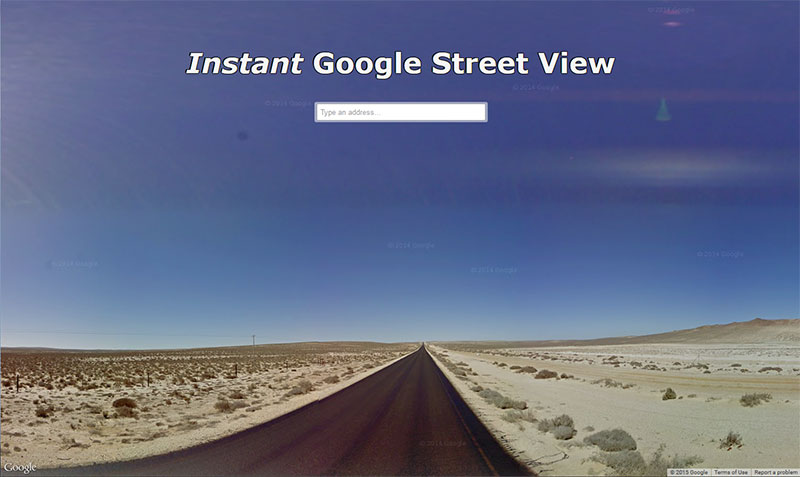
This project does something subtle, yet amazing with perception, including one's perception of technology. We've had Street View for half a decade now; the novelty of the fact that you can pull up an instant 360-degree panorama for a significant percentage of street addresses in the developed world has worn off.
Yet this makes it new again – I found myself laughing like a child as I slowed down my typing, watching my screen be transported to a completely new location with each keystroke. It made me appreciate anew the technology at work, while also appreciating the daftness of it all, jumping around the world en route to my destination as if propelled by some sort of Douglas Adams-style teleporter. Fantastic work.
Agreed, street view has always amazed me. But what this does differently, which is very useful, is that it gives me the ability to download a large image quickly of a location.
I can use this for work and it removes some friction from my workflow. Thanks for sharing!
Upvoted for the lyricism and poetic nature of your comment; I'm not very receptive to the magic (or usefulness) of this, but your comment made it worthwhile! ;-)
Contrary to what some of the commenters said about this being non-useful and just novelty, I think this brings forward one of the best features of Google Maps by cutting out a lot of (potentially frustrating) steps in the UX. Here’s the typical flow for finding street view when searching on maps.google.com:
1. Submit search query
2. Review results list
3. Repeat 1-2 in case user did not find their intended target
4a. Drag the street view marker onto the map OR
4b+5. Click “more” from the results list, then Street view Instant Google Street View reduces this to just one easy step, and makes it much more fun along the way. I think the benefit of this is similar to the benefit of Google’s instant search results - making the UX fast, efficient, and fun to discover what you’re looking for. The creator of this should definite consider expanding this to also include street view and satellite view (surprised Google hasn’t done this already). And I wouldn’t be surprised if he got a call from Google soon for an interview… either for a job offer or a acqui-hire. Cheers, nicely done.
You are right, although IMO that benefit comes more from cutting out the in-between steps, rather than the "instant" quality of this application. What I mean is, cutting out all those steps so you just type the address (with autocomplete/suggestions) and immediately see the streetview, is really really great. But--and I realize I might be in a minority here--they didn't need to cut out the final step, which is to press enter to submit :) But then, I've always found that feature in Google Instant very distracting, and go to lengths to disable it for myself.
Either way, that's a very keen observation, there's quite a few steps to go from an address to a streetview in the current form of Google Maps and this app does solve that.
The tour of the white house was pretty interesting. If you typed in "oval offi" it takes you to some gold room that I don't recognize, and if you step outside, there's a big portrait of Hillary Clinton. Do the first ladies all have their portraits?
> What's interesting is the real google streetview needs adobe flash to run, this works with flash disabled.
Since they've started targeting mobile browsers, they've switched in some places to the projection here (which uses a flat projection that is just translated), which is implemented in straight HTML + JS. In other words, this is official Google StreetView too, just their new embeddable viewer.
This isn't using either Flash or WebGL, though. It's a pure JS tiling solution, similar to classic Google Maps, but with a Mercator-style 3D-to-2D projection.
This is way too addicting. I've been typing in addresses one letter at a time, just to see what pops up: a beautiful metro station in Saint Petersburg, the graffitied walls surrounding an airport in Brazil, a neighborhood in South Africa, a wooded street in suburban North Carolina, a deserted country road in rural Iowa, the entrance to a gated community in Texas, and finally, my house. What a fun way to explore. Great work!
The feeling of seeing a sequence of random, unfamiliar locations, followed all of a sudden by a familiar street is really amazing. Especially if you type in the address of a street you haven't lived on for a long time.
Comments (101) 48 threads
Yet this makes it new again – I found myself laughing like a child as I slowed down my typing, watching my screen be transported to a completely new location with each keystroke. It made me appreciate anew the technology at work, while also appreciating the daftness of it all, jumping around the world en route to my destination as if propelled by some sort of Douglas Adams-style teleporter.
Fantastic work.
I can use this for work and it removes some friction from my workflow.
Thanks for sharing!
1. Submit search query 2. Review results list 3. Repeat 1-2 in case user did not find their intended target 4a. Drag the street view marker onto the map OR 4b+5. Click “more” from the results list, then Street view
Instant Google Street View reduces this to just one easy step, and makes it much more fun along the way.
I think the benefit of this is similar to the benefit of Google’s instant search results - making the UX fast, efficient, and fun to discover what you’re looking for. The creator of this should definite consider expanding this to also include street view and satellite view (surprised Google hasn’t done this already).
And I wouldn’t be surprised if he got a call from Google soon for an interview… either for a job offer or a acqui-hire.
Cheers, nicely done.
Either way, that's a very keen observation, there's quite a few steps to go from an address to a streetview in the current form of Google Maps and this app does solve that.
Also try "google campus".
What's interesting is the real google streetview needs adobe flash to run, this works with flash disabled.
Since they've started targeting mobile browsers, they've switched in some places to the projection here (which uses a flat projection that is just translated), which is implemented in straight HTML + JS. In other words, this is official Google StreetView too, just their new embeddable viewer.
To use street view, you need Adobe Flash Player version 10 or newer. Get the latest Flash Player.
When I try to go to http://maps.google.com/maps?vector=1 to enable webgl it goes into an endless loop.
This page might explain why: http://support.google.com/maps/bin/answer.py?hl=en&answe...
Some low-end integrated GPUs (like the Intel GMA 3100 and 3150) are not compatible
This is too much fun :)
(i was once asked to give my address here, started with 'europa', and got the reply 'no, your address here in chile'...)
(Try hitting the plus to edit the shader on the left)
All comments shown.
Couldn't load more comments. Check your connection and try again.