Show HN: A free creative suite, built in Rust, for AI collaboration (opens in a new tab)codeyam.com
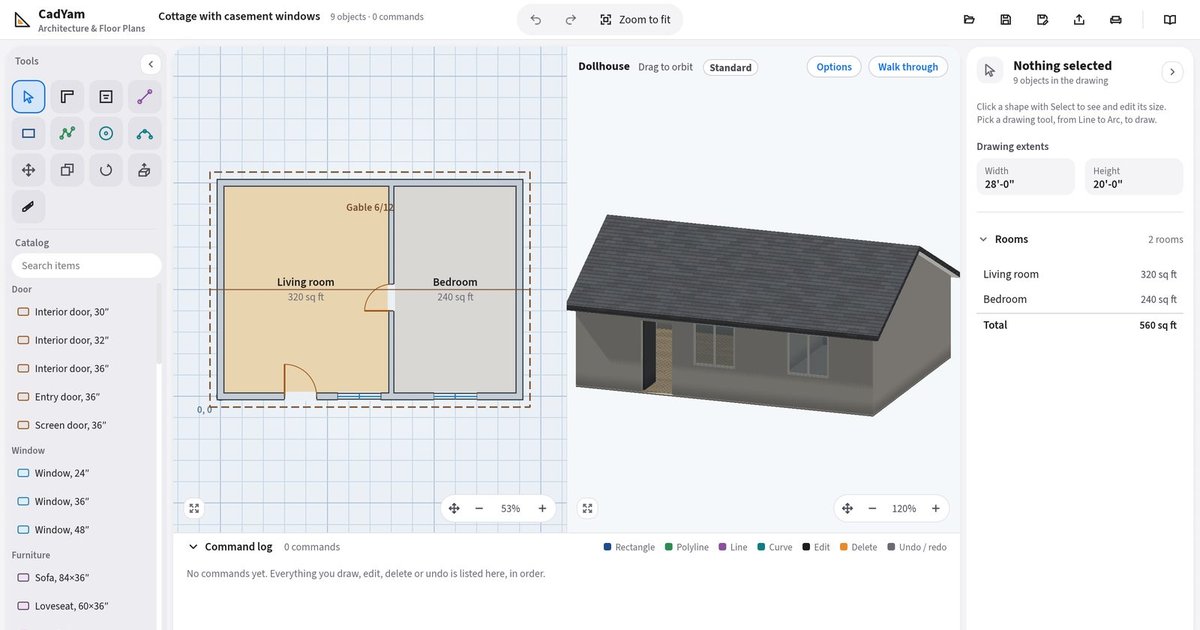
5 pointsCadYam is a desktop design app built for a person and an AI agent to work on the same project: a CAD drawing, a video, an interior design plan, a data analysis, etc. You can sketch something by asking it to your agent and drop a pin on a specific place to ask for changes.
We built this after a lot of frustration trying to learn traditional CAD tools, which have a steep learning curve and take a lot of time and effort before you can build anything complex. With CadYam, the agent can do the work for you with your guidance or teach you how to use the app if you'd like to do some manual work yourself, so you also don't always need the agent.
The agent's changes show up as a preview you iterate on with natural language. No technical skills required to use it. You can watch a short demo (under a minute) at https://youtu.be/NbA28Pshxyo or click around some demo exports in your browser without installing anything: https://codeyam-ai.github.io/cadyam-exports/
We were also inspired by the HN threads about creative tools rebuilt in Rust, e.g. discussed in this HN thread: https://news.ycombinator.com/item?id=49959605
Some technical details:
- CadYam is written in Rust and runs a local MCP server. Agents connect to it and use the same commands you do, so they can drive almost everything in the app. CadYam has instructions for connecting a range of agents.
- We built CadYam with CodeYam (codeyam.com), a product we developed for building software with AI. It lets us develop quickly while keeping the app well organized and well tested. We're shipping about two dozen fixes and features a day (more than 600 in the last month), so feature suggestions and bug reports are welcome and should get fixed quickly.
- The app is currently free for macOS, Windows, and Linux. It probably won't be free forever, but if we do charge, it will be a small amount. It's inexpensive for us to develop, and it doubles as a demo of what you can build with CodeYam.
We'd love for you to try it and share your feedback.
Comments (8) 6 threads
If anyone tries it and has feedback or use cases like these we'd love to hear about them. We can built it very fast so just need to know how to prioritize where to push on improvements.
All comments shown.
Couldn't load more comments. Check your connection and try again.