Hi HN! In the past, I spent over 7 years working on Apple Mail, and today I am really excited to share a new email client I'm building: Mimestream, a native macOS email client for Gmail.
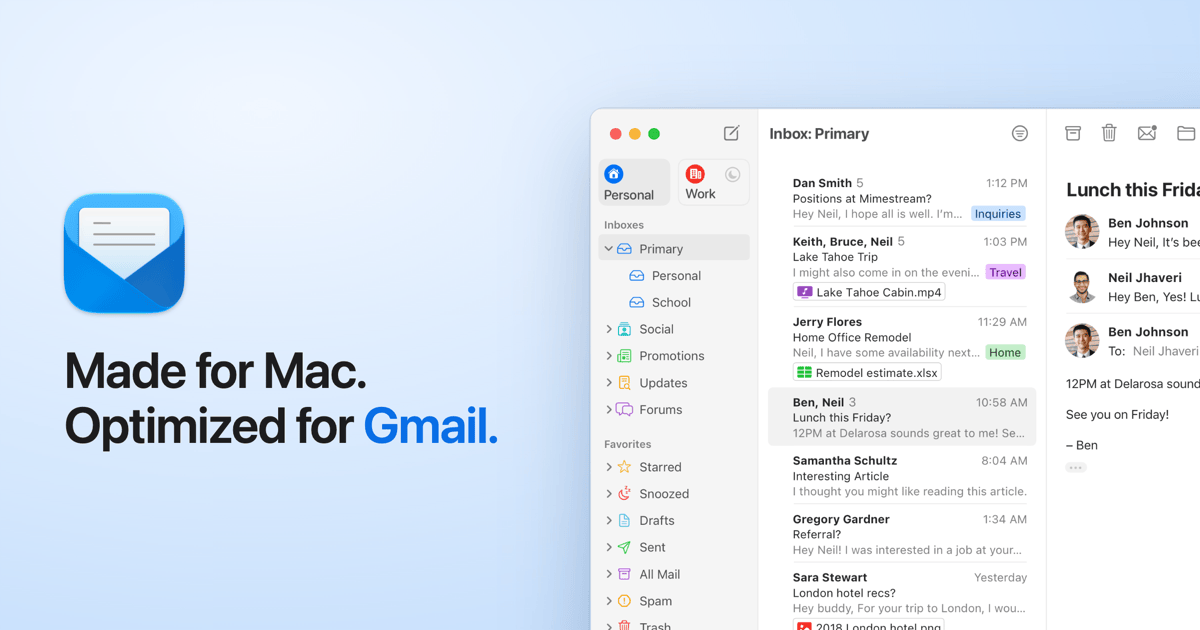
Mimestream is written in Swift, and uses AppKit+SwiftUI for a clean, stock appearance. It's designed to be fast, lightweight, and use a minimal amount of disk space. Mimestream's advantages over using the Gmail web interface includes features like multiple accounts, a unified inbox, system notifications, swipe actions, dark mode, (some) offline support, tracker prevention, multiple keyboard shortcut sets, and more. Mimestream differs from other email clients because it uses the Gmail API rather than IMAP, so it supports more Gmail-specific features like categorized inboxes, Gmail's search operators, first-class labels support (apply multiple via ⌘L, set colors, etc), synced aliases, synced signatures, etc. I'm planning a lot more work in this area, including server-side filter configuration, Google Drive support, G Suite directory autocomplete, and more. The app is a traditional email client that makes direct connections to Gmail and stores your data on your Mac. There are no intermediary servers with access to your account or copies of your messages. Mimestream is free for a limited time during the public beta, but will eventually be a paid app by the time it gets to the Mac App Store. I hope you enjoy trying out the beta, and I look forward to hearing your feedback!
This is a great point: "There are no intermediary servers with access to your account or copies of your messages." A number of popular email clients use intermediary servers and that's a complete deal breaker for me. I'd argue that should be a deal breaker for almost anyone. I'm not a security expert, but as far as I can tell, for most people the single biggest security vulnerability is an attacker gaining access to their email. Using a mail client with an intermediary mail server essentially doubles the surface area attackers can exploit.
I never quite understood what the value add was for email-client developers to use intermediary servers. Is it to gather usage telemetry or something else?
Pessimistically for telemetry, but I suspect some of them are Javascript apps in a lightweight shell that have actual technical difficulties making a TCP IMAP connection.
Indexing and search can be sophisticated & available before downloading any messages; you can ensure completion of complex pop and imap operation (eg working with messages "tagged" by gmail); just a few benefits.
Note, this is in no way an endorsement of middle manning email management and facading as a client.
Usage telemetry can be gathered pretty easily from the client itself. Having an intermediate service is usually for stuff like push notifications, search, autocomplete, recommendations and really any other feature that goes beyond the email spec and would be difficult or cpu intensive to implement on all the clients.
On the positive side, you could use them for some privacy features, like predownloading images (works with popular clients like Gmail which prefetch them, whether you read the email or not, to water down analytics)
I was about to install it until i went through OAuth setup which grants the "Mimestream" application permissions do to a number of things including
"Read, compose, send, and permanently delete all your email from Gmail"
One can blame it on Google OAuth UI or on Mimestream UI, but its not clear to me whether these privileges are granted to the locally installed application and can only be used by it OR whether these privileges are Granted to "Mimestream" the Google OAuth App account which can then be used to do those actions outlined above by some service associated with "Mimestream" Google App. Needless to say, i chickened out from using my main google account with it and instead will test drive it with a toy account
I don't see much difference in the distinction between the client software (written by Mimestream, probably with regular updates) having access to your account, which it obviously has to has, and Mimestream having direct access. But IANA security researcher, so salt liberally.
There are two main differences:
1. Mimestream uses the Gmail API (instead of IMAP), so it supports more Gmail features: Gmail categorized inboxes, first-class labeling support (apply multiple, change color, etc), use all the Gmail aliases you have set up, use the signatures you set up in Gmail, and conduct server-side searches with Gmail search operators. A lot more is coming on this front, as the app is still in development.
2. This is a lighter-weight client with a minimal local cache. Mail downloads a copy of every message in your account and requires a lot more disk space to use.
Can you make this a competitor to Thunderbird rather than being locked into GMail?
I would love to have an app like this that used IMAP and was multiplatform!
This is fantastic, please support Google Advanced Protection as I cannot add my account as a result of it being enabled on my account.
"Advanced Protection prevented your Google Account from signing in. This security feature stops most non-Google apps and services from accessing your data to keep your account protected."
Do you need the full advanced protection setup (hw key required for every session)? It does work with the somewhat less draconian normal key support where the key is required just for new logins.
AFAIK from my time in the APP, The "blessed session" system doesn't work any differently as I don't recall needing the key to access passwords.google.com or anything like that.
Comments (272) 87 threads
Show all comments
Showing thread 1 of 87
Mimestream is written in Swift, and uses AppKit+SwiftUI for a clean, stock appearance. It's designed to be fast, lightweight, and use a minimal amount of disk space. Mimestream's advantages over using the Gmail web interface includes features like multiple accounts, a unified inbox, system notifications, swipe actions, dark mode, (some) offline support, tracker prevention, multiple keyboard shortcut sets, and more.
Mimestream differs from other email clients because it uses the Gmail API rather than IMAP, so it supports more Gmail-specific features like categorized inboxes, Gmail's search operators, first-class labels support (apply multiple via ⌘L, set colors, etc), synced aliases, synced signatures, etc. I'm planning a lot more work in this area, including server-side filter configuration, Google Drive support, G Suite directory autocomplete, and more.
The app is a traditional email client that makes direct connections to Gmail and stores your data on your Mac. There are no intermediary servers with access to your account or copies of your messages. Mimestream is free for a limited time during the public beta, but will eventually be a paid app by the time it gets to the Mac App Store.
I hope you enjoy trying out the beta, and I look forward to hearing your feedback!
Continue this thread — 2 replies
Note, this is in no way an endorsement of middle manning email management and facading as a client.
One can blame it on Google OAuth UI or on Mimestream UI, but its not clear to me whether these privileges are granted to the locally installed application and can only be used by it
OR
whether these privileges are Granted to "Mimestream" the Google OAuth App account which can then be used to do those actions outlined above by some service associated with "Mimestream" Google App.
Needless to say, i chickened out from using my main google account with it and instead will test drive it with a toy account
Continue this thread — 2 replies
Continue this thread — 4 replies
The multiplatform part is completely dependent on if anything is done to get appkit and swiftui working on other platforms, which is probably a solid "no" for the foreseeable future.
https://forums.swift.org/t/swiftui-for-non-apple-platforms-l...
Continue this thread — 1 more reply
Continue this thread — 16 more replies