Same here, we're fortunate it hasn't gone down the road of typical webdev anti-patterns. (at least besides the donation banners, which is understandable ;) )
I agree with you except the one pain point that Wikipedia still continues to use "m.*" sub-domains for displaying mobile content. I know most people exclusively use mobile these days but I use desktop browsers for reading more than 60% of the time and its really annoying to click on a Wikipedia link on HN/Reddit and having it open the mobile site on desktop. It's OK to use m.* subdomains instead of reactive design but there should at least be redirects to the correct subdomains.
However, that link is totally in the wrong place, no wonder I could not find it. I just assumed there was no such link/button and always angrily removed the 'm.' from each URL.
Equally, I don't like it when websites try to guess what kind of browser I'm in and force me into the mobile experience when I have a window take up half the screen on a 1080p monitor, ... so I guess there's really no easy win for this :(
Install Firefox Redirector: https://addons.mozilla.org/en-US/firefox/addon/redirector/
Add a rule to redirect (https?://)?(\w+\.)m\.wikipedia.org(.*) to $1$2wikipedia.org$3
Then you never have to deal with mobile Wikipedia on desktop again. You can use this for other sites too, like forcing all uses of Reddit to always open in old.reddit.com.
Just as a sidenote on the Reddit point, you can force old Reddit from your settings after you log in. That setting seems to stick even if you log out/your session times out, and you can go back to new Reddit with new.reddit.com.
> It's OK to use m.* subdomains instead of reactive design but there should at least be redirects to the correct subdomains.
I agree, although in the case of Wikipedia the "mobile" design is actually the one that is responsive. I want the "mobile" design on all browsers including my desktop. I believe you can actually set your default theme if you're logged into Wikipedia, but I don't know if their cookies eventually expire or what, but I often end up clicking on Wikipedia links and getting the awful "desktop" design. All of this is just to say that, yes, they shouldn't use separate "m." URLs, but it's just as wrong to get upset at mobile users sharing "m." URLs as it is to get upset at desktop users sharing URLs without the "m." Arguably if you expect all users to always share the most versatile URL, you should expect them to always share the "m." URL since it has a responsive design.
I might be ok with "the mobile reactive version everywhere" if it didn't also lack a bunch of features. Not being able to easily get to the talk page to contextualize what you're reading makes the mobile site very frustrating.
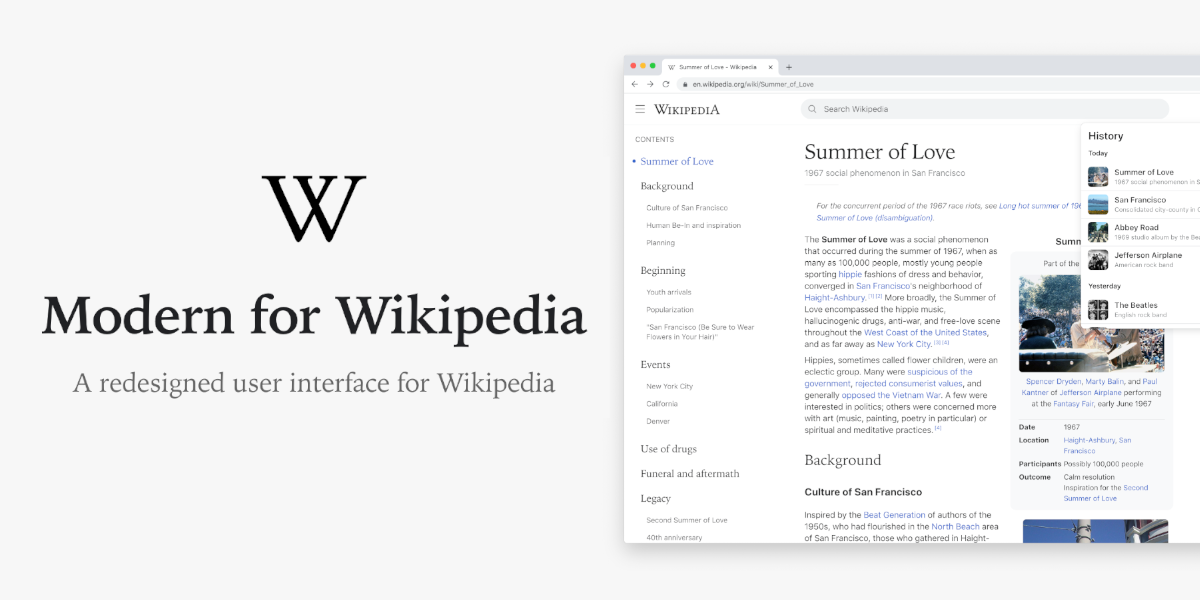
If it pinned the headings/outline to the left side of the article (like the extension showcased does) it'd be that much better for a responsive design on Desktop.
I disagree that the m. url is the most versatile because of the one-sided redirect.
Also the mobile site might be more responsive in the sense that it better scales down to narrower viewports but it does not scale up to make use of larger viewports by e.g. bringing back the sidebar and other links that are hidden behind dropdowns. That's a problem with many mobile-first designs - in reallity they are mobile-only designs.
semi-OT but Twitter seems to have recently started putting "mobile.twitter.com" in my URL bar (on mobile), as well as adding a UUID in a "t" query param when you use their "copy link" flow, which is all annoying cruft to have to delete when sharing links.
They used to just put "?s=19" through "?s=22" or so, which enumerated clients (desktop, mobile, Android, etc), which was better than the junk most other services stuff in (like utm_source and friends...)
What bothers me most about this is that if you go to www on a mobile device, it redirects you to m - that's great, and probably the "right" thing to do. There is probably a "View Desktop Version" link on the mobile page, somewhere. But if you go to the m subdomain on a desktop device, there's no easy way to get to the desktop version without manually changing the URL. If you can redirect from www to m, surely you can redirect from m to www when appropriate.
Comments (409) 120 threads
Show all comments
Showing thread 2 of 120
But i am sure there are people who will appreciate your effort. Thank you for your work.
edit: formatting
https://addons.mozilla.org/en-US/firefox/addon/skip-mobile-w...
However, that link is totally in the wrong place, no wonder I could not find it. I just assumed there was no such link/button and always angrily removed the 'm.' from each URL.
Continue this thread — 28 replies
I agree, although in the case of Wikipedia the "mobile" design is actually the one that is responsive. I want the "mobile" design on all browsers including my desktop. I believe you can actually set your default theme if you're logged into Wikipedia, but I don't know if their cookies eventually expire or what, but I often end up clicking on Wikipedia links and getting the awful "desktop" design.
All of this is just to say that, yes, they shouldn't use separate "m." URLs, but it's just as wrong to get upset at mobile users sharing "m." URLs as it is to get upset at desktop users sharing URLs without the "m." Arguably if you expect all users to always share the most versatile URL, you should expect them to always share the "m." URL since it has a responsive design.
Continue this thread — 2 replies
Also the mobile site might be more responsive in the sense that it better scales down to narrower viewports but it does not scale up to make use of larger viewports by e.g. bringing back the sidebar and other links that are hidden behind dropdowns. That's a problem with many mobile-first designs - in reallity they are mobile-only designs.
They used to just put "?s=19" through "?s=22" or so, which enumerated clients (desktop, mobile, Android, etc), which was better than the junk most other services stuff in (like utm_source and friends...)
You may find humour in the comically small "desktop" link at the very end of the page, next to the privacy policy.
Continue this thread — 1 reply
Continue this thread — 7 more replies
Continue this thread — 11 more replies