Show HN: iFixit created a new USB-C, repairable soldering system (opens in a new tab)hackaday.com
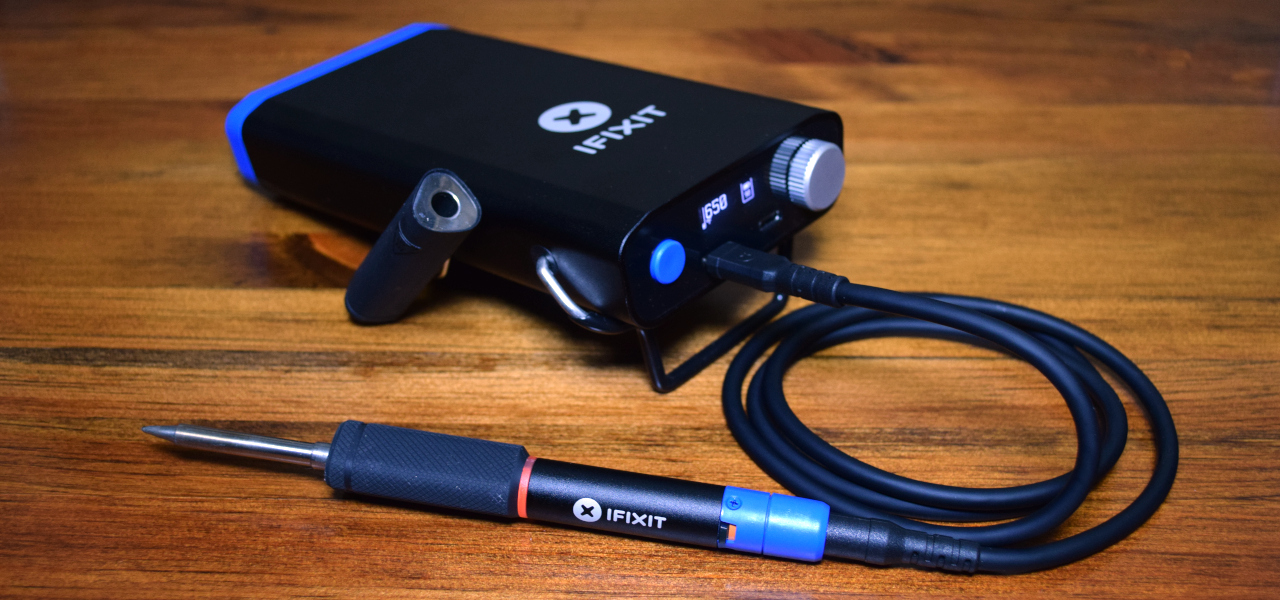
928 pointsIt's a USB-C powered soldering iron and smart battery power hub. Super repairable, of course. Our goal is to make soldering so easy everyone can do it:
https://www.ifixit.com/fixhub
We didn’t want to make just another iron, so we spent years sweating the details and crafting something that met our exacting standards. This is a high-performance iron: it can output 100W of heat, gets to soldering temperature in under 5 seconds, and automatically cools off when you set it down. The accelerometer detects when you pick it up and heats it back up. Keeping the iron at a lower temperature while you’re not soldering shouold prolong the life of the tip.
What’s the difference between this iron and other USB-C irons on the market? Here’s a quick list:
Higher power (our Smart Iron is 100W, competitors max out at 60W over USB-C, 88W over DC Supply)
Heat-resistant storage cap (you just have to try this out, it’s a real game changer in day-to-day use)
Polished user experience
A warranty and a local company to talk to (I can’t find any contact information for Miniware)
Comfier / more natural grip
Shorter soldering tip length
No-tangle, heat-resistant cable
Locking ring on the cable, so it can’t snag and get disconnected (this happens to me all the time on other irons)
More intuitive settings, either on the Power Station or on the computer
We used Web Serial https://caniuse.com/web-serial for the interface, which is only supported in Chromium browsers. The biggest bummer with that is that no mobile browsers support it, yet. Hopefully that changes soon.
Hardware is hard! It's been a journey for us. Happy to answer any questions about how we made it.
Schematics and repair information are online here: https://www.ifixit.com/Device/FixHub_Portable_Soldering_Stat...
Comments (405) 75 threads
Show all comments
Showing thread 2 of 75
- comfier grip
- shorter tip length and presumably a more solid feel (the pinecil's mechanical interface to the tip is pretty loose-feeling)
- higher power over usb-c (actually can't think of a time I've needed more than 60W for hobby stuff, but I can imagine use cases like large ground planes)
- storage cap (this is a major improvement for working in a temporary, tight space)
All of these would be worth the price increase over pinecil, but unfortunately I think the lack of on-iron temperature settings is a dealbreaker. The pinecil in my toolbag is practically the size of a sharpie and works with my existing usb-c cables and batteries with no extra space taken up, and the killer feature (portability) is broken once you need a proprietary battery or a laptop to change temperature.
In our testing, we rarely need to change temperatures. I think our algorithm does a better job of responding to the power load and flowing heat into the material than other irons. Of course, if you're changing solder then you'll need to change the temperature setting.
We built the web interface with mobile in mind. We just need a mobile browser that supports web serial. Someone else posted a WebUSB polyfill, and I'm going to check that out tomorrow.