Show HN: iFixit created a new USB-C, repairable soldering system (opens in a new tab)hackaday.com
928 pointsIt's a USB-C powered soldering iron and smart battery power hub. Super repairable, of course. Our goal is to make soldering so easy everyone can do it:
https://www.ifixit.com/fixhub
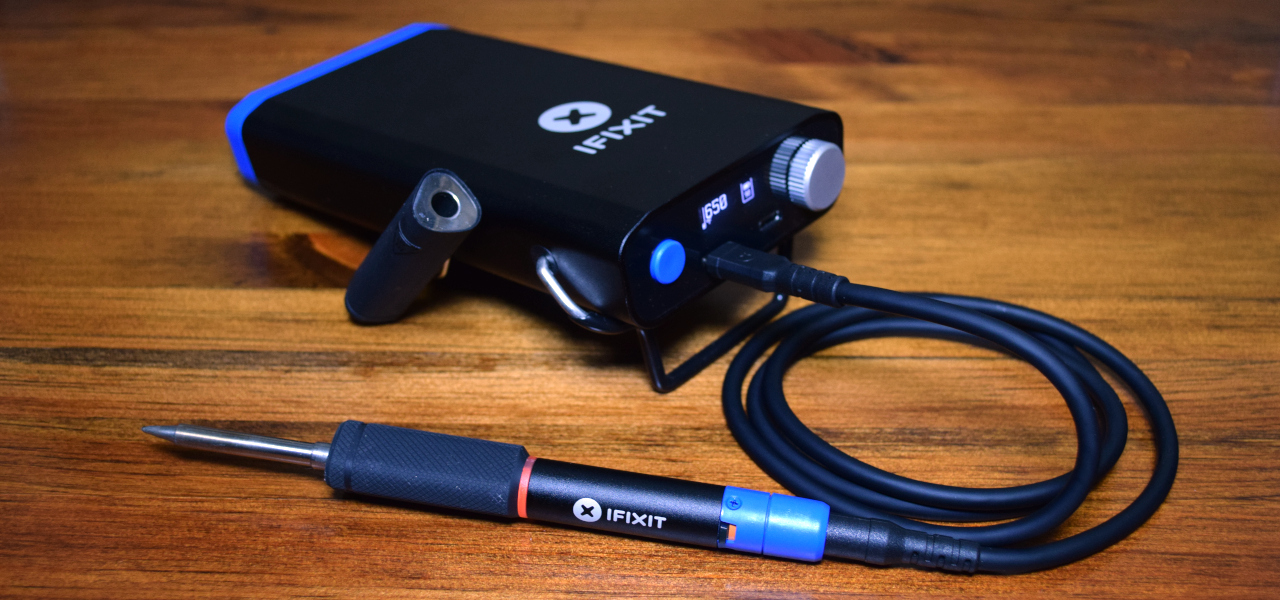
We didn’t want to make just another iron, so we spent years sweating the details and crafting something that met our exacting standards. This is a high-performance iron: it can output 100W of heat, gets to soldering temperature in under 5 seconds, and automatically cools off when you set it down. The accelerometer detects when you pick it up and heats it back up. Keeping the iron at a lower temperature while you’re not soldering shouold prolong the life of the tip.
What’s the difference between this iron and other USB-C irons on the market? Here’s a quick list:
Higher power (our Smart Iron is 100W, competitors max out at 60W over USB-C, 88W over DC Supply)
Heat-resistant storage cap (you just have to try this out, it’s a real game changer in day-to-day use)
Polished user experience
A warranty and a local company to talk to (I can’t find any contact information for Miniware)
Comfier / more natural grip
Shorter soldering tip length
No-tangle, heat-resistant cable
Locking ring on the cable, so it can’t snag and get disconnected (this happens to me all the time on other irons)
More intuitive settings, either on the Power Station or on the computer
We used Web Serial https://caniuse.com/web-serial for the interface, which is only supported in Chromium browsers. The biggest bummer with that is that no mobile browsers support it, yet. Hopefully that changes soon.
Hardware is hard! It's been a journey for us. Happy to answer any questions about how we made it.
Schematics and repair information are online here: https://www.ifixit.com/Device/FixHub_Portable_Soldering_Stat...
Comments (405) 75 threads
Show all comments
Showing thread 8 of 75
$110 cad for the soldering iron is semi-reasonable, if a bit high compared to their competitors. $342 for the iron + battery means that's a $230 battery pack, which is absolutely insane.
Requiring the battery pack to be able to easily change controls means anyone doing more than super basic work, needs the $342 combo.
I spent over 200$ on a glorified PCB holder and some probes (PCBite), which is in hindsight one of the most useful tools I own and still makes me happy every time I use it (even that alone is kinda worth it over time!).
I don't know your financial situation, but just consider: How much do you spend each month on meals/entertainment? Is $300 actually an inappropriate cost for a quality thing that you often need?
Note: Iron + station shows up as $250 to me, $350 is the set with some additional bits and bobs.
And most of what you are going to overpay (?) for this is going to ifixit, which is also a plus. It's like buying merch from a band you like.
Continue this thread — 4 replies
The ts100 and variants of it have been around for a long time, can be adjusted on device and powered by regular usb pd power banks.
IMO 340€ for the whole set with the wirecutters and tweezers and such is still an ok deal, even though it is slightly expensive, because the accessories are probably good quality also, and there are few things as frustrating as bad wirecutters ;).
I see this is a potential "better quality" portable option for a professional (than something like a Pinecil and a TS100), that might want to carry it around or use it when not at a desk, but the quality and performance remains to be seen (though I do trust iFixit).
At £240 in the UK, it's about 2.5x the cost of the Pinecil + Powerbank (which I already had). If I didn't have a Hakko soldering station and wanted something portable but capable to use fairly regularly, this seems like a good option.
For everyone else, if you already own a PD powerbank, the ~£25-30 (~£50 with a bunch of tips) for a Pinecil is _much_ more palatable.
The comparison here is a Pinecil. I've been using a Pinecil for a couple of years now, I power it from a USB-PD power bank that's already in my backpack, and charges everything else I carry, and has more capacity and a lower price than this one, and the Pinecil without the power bank is much cheaper and more functional with its buttons and display than this iron alone; I don't need a PC (and I don't use Chrome anyway, though I do really like the WebSerial configuration).
I already own a Hakko soldering station, but I find I reach for the Pinecil 99% of the time due to convenience; only when I know I'll be doing a _lot_ of soldering in one go, and I'm going to do it at my desk, do I get the Hakko out.
This looks like a nice iron, and I'm all for supporting repairability (and iFixit in general), if someone will use it as their main station, and assuming this can perform, it seems like an excellent option.
For everyone else, a Pinecil and that powerbank you already have is an excellent option at a trivially low price.
EDIT: Fixed some typos
If you just buy the iron, you have access to all the settings in our web console: https://www.ifixit.com/fixhub/console
The iron persists settings when you unplug it. You can change the sleep timer and timeout, set target temperatures, calibrate the accelerometer, and more.
The Power Station is nice to have, but you don't lose any functionality without it.
FWIW this is just my $0.02. I'm sure you'll still sell lots, but if that had an onboard display + buttons then I'd have ordered one right away for the other nice tweaks you've done.
YMMV, but I think you can get a lot of mileage with a setup like that. Thinking about it, even my 'stationary' old Weller is used as an ON/OFF affair 98% of the time.
Looked around, heard Joule was the "go to" these days, got one. Gave it the fuck away eventually after the 15th time the app lagged or wouldn't work or whatever.
I'm sick and tired of my tools (yes it's a cooking tool) having the audacity to require an app. I get there's a lot of possible functionality that an app provides, but the annova I replaced it with still has a functional interface so I don't have to fuck with it for the basics.
I don't even see what the workflow would be to use their web interface on this iron?
Continue this thread — 6 replies
So how are you supposed to actually use that? I don't think there are any computers out there which can provide 100W out of their USB ports.
Am I supposed to unplug the iron from its power supply, plug it into a computer, change the temperature, unplug it, plug the power supply back in, wait for it to heat up, and finally continue soldering? That's awkward enough that even a crappy proprietary smartphone app would've been better!
https://www.amazon.com/dp/B07XF5489G
Make sure it can support 100W (that one only goes to 85W).
Plug one end into your PC, one into a wall charger, and one into your soldering iron.
If you want to solder such a thing yourself, there's USB-C PD data/power splitters sold in various places (it needs to be smarter than just connecting pins, since it needs to intercept the power negotiation), but I haven't yet found a part that is advertised to handle 100W.
The hub has a bunch of female ports, and one male USB C port.
The male USB port is the only one that provides USB PD charging output, and it is also the only port that can be used with a USB host machine.
This means that it cannot be used to change settings on the iFixit iron with a computer and give give the iron enough power to heat up. It's not an improvement at all over a regular computer that also cannot do both of these things concurrently.
It looks like a lovely hub to keep on a desk for plugging in a laptop, but it is broadly limited to doing exactly that.