Show HN: iFixit created a new USB-C, repairable soldering system (opens in a new tab)hackaday.com
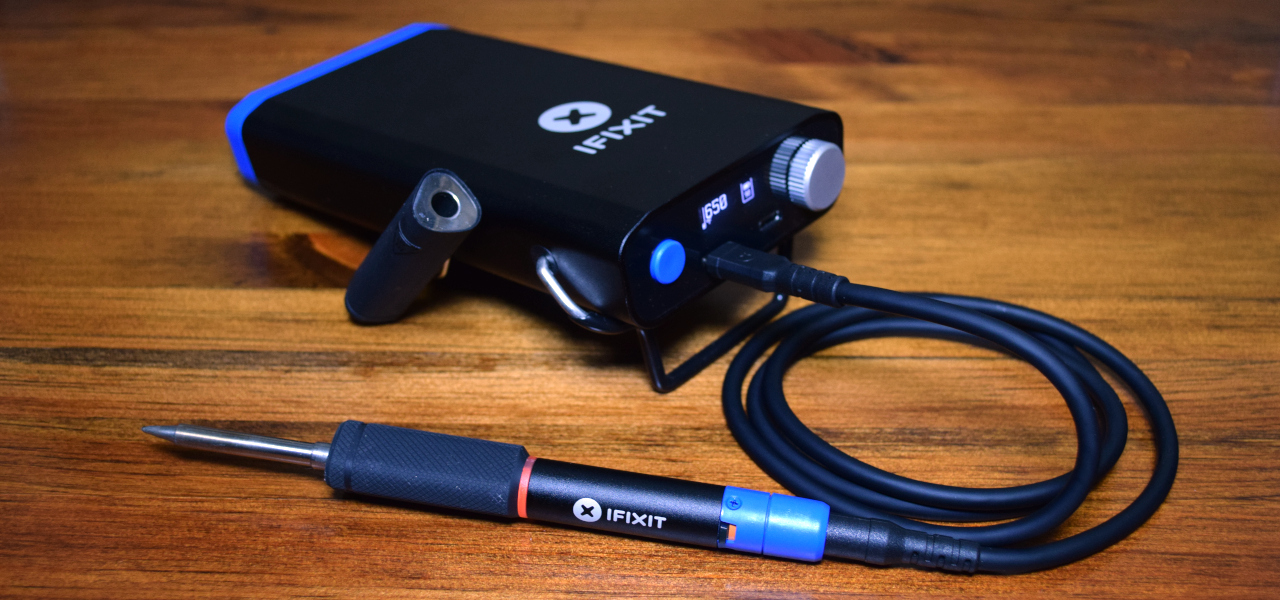
928 pointsIt's a USB-C powered soldering iron and smart battery power hub. Super repairable, of course. Our goal is to make soldering so easy everyone can do it:
https://www.ifixit.com/fixhub
We didn’t want to make just another iron, so we spent years sweating the details and crafting something that met our exacting standards. This is a high-performance iron: it can output 100W of heat, gets to soldering temperature in under 5 seconds, and automatically cools off when you set it down. The accelerometer detects when you pick it up and heats it back up. Keeping the iron at a lower temperature while you’re not soldering shouold prolong the life of the tip.
What’s the difference between this iron and other USB-C irons on the market? Here’s a quick list:
Higher power (our Smart Iron is 100W, competitors max out at 60W over USB-C, 88W over DC Supply)
Heat-resistant storage cap (you just have to try this out, it’s a real game changer in day-to-day use)
Polished user experience
A warranty and a local company to talk to (I can’t find any contact information for Miniware)
Comfier / more natural grip
Shorter soldering tip length
No-tangle, heat-resistant cable
Locking ring on the cable, so it can’t snag and get disconnected (this happens to me all the time on other irons)
More intuitive settings, either on the Power Station or on the computer
We used Web Serial https://caniuse.com/web-serial for the interface, which is only supported in Chromium browsers. The biggest bummer with that is that no mobile browsers support it, yet. Hopefully that changes soon.
Hardware is hard! It's been a journey for us. Happy to answer any questions about how we made it.
Schematics and repair information are online here: https://www.ifixit.com/Device/FixHub_Portable_Soldering_Stat...
Comments (405) 75 threads
Show all comments
Showing thread 3 of 75
[0] https://pine64.com/product/pinecil-smart-mini-portable-solde...
>The star of the show is, of course, the Smart Soldering Iron. It’s a 100 watt iron that comes up to operating temperature in under five seconds and can work with any suitably beefy USB-C Power Delivery source. The size and general proportions of the iron are very close to the Pinecil V2, though the grip is larger and considerably more comfortable to hold. The biggest difference between the two however is the absence of a display or configuration buttons. According to iFixit, most users don’t change their settings enough to justify putting the interface on the iron itself. That doesn’t mean you can’t tweak the iron’s settings when used in this stand-alone configuration, but we’ll get back to that in a minute.
And with a (simple) firmware change and the appropriate 28v EPR charger, it can do 140w.
https://wiki.pine64.org/wiki/Pinecil#Power_Chart
And you cannot fix this with updates, no firmware can magically grow buck converter with beefy inductor inside the iron...
The chart is intended to show values for both kinds of tips that are usable on a Pinecil. V2 tips have a lower resistance, by design, and either style can be used with either handle.
Temperature is not indicated, although resistance can vary with temperature. But then: Temperature is never indicated for power of soldering irons. If you want to begin a trend of producing this data and filling this void, then by all means do so. Let me know how I can help.
And no, we absolutely do not need a buck converter to accomplish heating a resistive element in a circuit, nor to use PWM to modulate the average power dissipation of this circuit. (A buck converter can be used; sure! But E=IR and P=IE anyway.)
Given that resistance is mostly fixed you cannot reach the maximum rated power, unless your tip is precisely matched for any of these fixed steps. And PWM does not work with some power sources because of sensitive overcurrent protection.
Or what, exactly? What function does a buck converter serve in this application?
You'll have to spell it out for me, because right now using a buck converter in a portable USB-powered soldering iron sounds like a solution looking for a problem to solve.
Most of casual users of usb-c irons do not care about it, but if you ever used professional stuff, these usb toys appear to be deficient in comparison.
They are universal, after all -- at least downwardly.
And what may be some examples of a "pro" soldering iron that uses a buck converter (or transformer taps or whatever) to be flexible to a variety of input voltages?
Continue this thread — 4 replies