Lurker News
Hey HN,

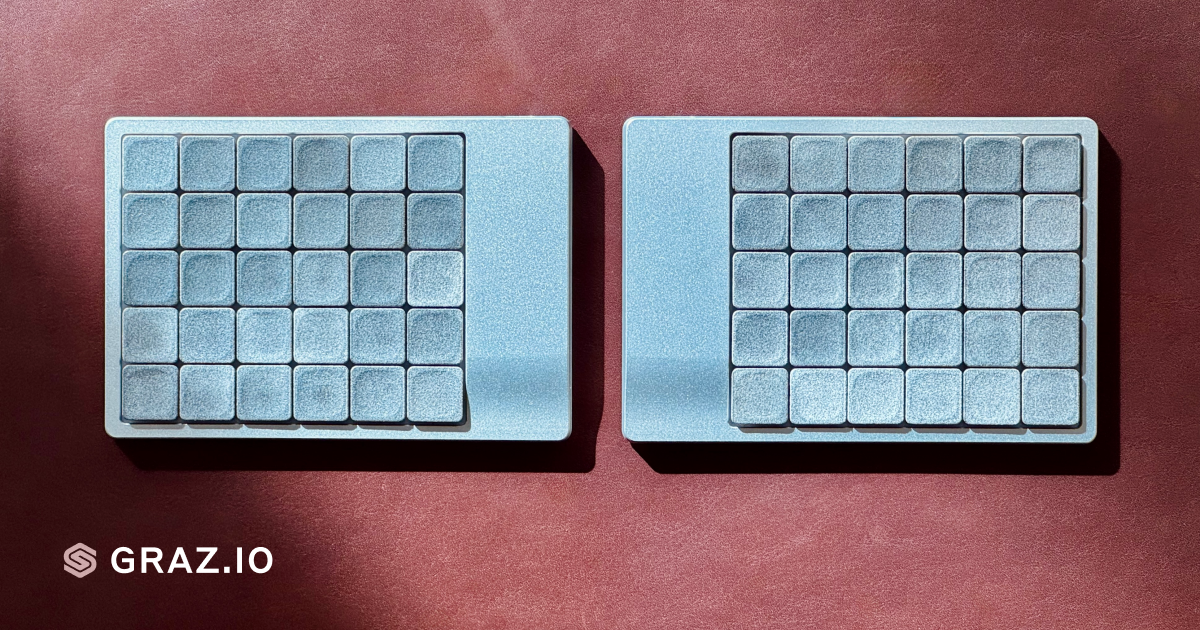
I built a wireless, split, ultra-low profile keyboard from scratch called Bayleaf. As a beginner I learned all things electronics, PCB-building, designing for manufacturing, and many other hardware-related skills to put this together.
This case study dives into the build process and of course the final result, hope you enjoy!
Comments (247) 85 threads

Earlier comments
snide1 reply#
This is beautiful. I'm a "Let's Split" style keyboarder as well so this made me giddy! There's a distinct lack of solid cases out there for this layout style.

You mention possibly mass producing the next round. Please add a notify email list or something. I'd be all over this.

__mharrison__2 replies#
I think cases are the biggest issue with DIY keyboards.

The plastic laminate of my ergodoxen was stiff, sturdy, and heavy. The exposed bolts were a little industrial. Very much had a DIY look.
My Lily58 started out with the PCB "case" which is horrible. Way too flexible, and switches falling out as soon as you attempted to transport it. (Easy transport was my main motivation for the smaller keyboard.)
Eventually, I was able to convince someone on Etsy to print me a 3d case for it. It is ok. Much better than the PCBs. However, switches still have a tendency to pop out when moving the keyboard.
The case on the Bayleaf makes me wonder if other keyboards could do a better job with case offerings.
I've always gone with wired keyboards because dealing with batteries seems annoying.
Looking at this keyboard makes me realize that I've optimized for functionality but this beauty is optimized for form.

jsheard#
3D printed cases do vary in quality quite a bit, something made with a cheap consumer FDM printer won't be nearly as nice as a resin SLA or nylon MJF/SLS case printed on an industrial-grade machine and professionally finished. The latter processes are pretty accessible these days from companies like JLCPCB or PCBWay.

You can even get them to 3D print metal parts with an SLM process, although that's on the pricier side.

Palomides1 reply#
>do a better job with case offerings

for hobby businesses like most of these weird little keyboards, adding $200 to the parts cost is a real stretch, considering their already niche appeal and limited capital for investment

__mharrison__#
Folks are already paying $200+ for these keyboards. Some pay $50+ for a single keycap.
nicksergeant4 replies#
I've wanted this for years. I've tried so many "ergonomic" mechanical keyboards, but the huge key travel (even if very soft switches), tends to always give me finger/wrist issues over a few weeks.
nicksergeant1 reply#
>> Can I buy this keyboard? > Negative, this singular prototype is not for sale.

:sobbing:
I hope someone builds / sells this! Instant buy for me, if so.

abound#
But then, the next question down:

> Are you planning to sell this keyboard at scale?
> Dependent on the reception, likely yes. But it wont be exactly this design. A second iteration is in the works with improved sound profile and ergonomics. Stay tuned.

stronglikedan#
I had all those issues too, until I remembered my high school typing class where the teacher would slap our wrists with a ruler if they were resting. Now I lift my wrists like I was taught, and use non-split keyboards with better results than I used to get with splits.
unitexe2 replies#
To reduce mouse hand travel I got a roller mouse pro slim about 6 months ago. Not great for fine motor tasks but exceptional for other general uses. Alleviated a lot of pain in my hands and fingers.

I use this with a small slim keychron keyboard and with a kinesis advantage 360.
The roller seems to be getting a bit sticky after 6 months of heavy use and transporting it between work and home. Nonetheless, would get another in a heartbeat.
Perhaps worth a look?

unitexe#
I keep my Logitech MX close cause the infinite scroll is just too damn good. But the MX kills my hands when using for prolonged periods.
jacksontheel#
Roller mice are great. I also set up my keyboard such that I can hold down a key and use WASD to move my mouse, with J being left click and K being right. That's been a game changer for me, too.
lycopodiopsida1 reply#
There is always Glove80, choc switches have very little travel.
jsheard2 replies#
Eh, Choc switches have less travel than MX switches but I wouldn't say they have very little travel. Chocs main selling point is the form factor which allows the keyboard chassis to be much thinner. MX switches usually have 4mm of travel, Choc switches have 3mm, while the PG1316S switches used in OPs keyboard only have 1.8mm. I think Apples current switches are even shallower at ~1mm.
nicksergeant1 reply#
Yeah. The travel on the Apple Magic Keyboard, which I can't seem to pry myself away from, is around 1.15mm.

Continue this thread — 1 reply

jjani#
> while the PG1316S switches used in OPs keyboard only have 1.8mm

Do you happen to know of a resource around this topic? I'd love to know what the actual lowest travel switches are. In my experience it's the Macbook's.

elromulous2 replies#
"Sans stagger — I’m not against stagger, I just love the neat look of a pain rectangle." [sic]

What an apt typo :)

speff1 reply#
Pain indeed. I tried an ortho layout a few weeks ago on a split Corne and developed really bad wrist pain. No idea why, but it went away after reverting to a stagger and giving that hand a break
jackpeterfletch4 replies#
I’m personally not convinced by the theory of ortho.

It seems to stem from the idea that stagger is a hangover from the typewriter, in which it was required to make room for the mechanics, and that if we didn’t need to make them like that, we wouldn’t have.
Hence the keys should be lined up so your fingers just move up and down.
However I think this has 2 problems.
1) Most ortho keyboards have 5 columns for 4 fingers.
2) In stagger I use different fingers to strike the same letter dependent on what the preceding letter was, so that I almost never use the same finger twice in a row. You can’t do this in ortho if the 2 letters are in the same column, leading to more repeated strikes from the same finger.
Which I would expect is both slower and more straining.
But maybe my technique is weird, or haven’t given the ortho enough time.
(if you like ortho, good for you, not trying to spoil your fun, just musing)

LAC-Tech#
If you think about regular keyboard stagger though, your fingers are always going towards the top left. It's not uniform.

So if this sort of stagger is good, do we want top left stagger on one side, and top right stagger on the other?

3np#
Vertical stagger is where it's at. Shifting key height per column put keeping columns straight.

The comfortable level of stagger is individual. I just can't with ortho but I guess it's a good fit for some folks' hands. For most of us, middle finger rests comfortably in a higher spot than pinky does. Just look at your hand. You won't really know until you try yourself.

the_gipsy#
AFAIK your technique is very weird. Traditionally, every key has an assigned finger.
MetaWhirledPeas#
> the theory of ortho

What theory of ortho? It's merely a rejection of stagger. Stagger represents our unwillingness to try new things even if the old thing makes no sense whatsoever.
OK, attitude aside now: for me it's partly about the ability to find keys by feel. With stagger you can learn touch typing one row above the home row and one row below the home row, no problem. But when you start trying to learn touch typing for the number row the difficulty jumps up significantly, because the nonsensical stagger makes it difficult to feel your way up the column.
So the benefits of ortho, according to me:
- It's easier to touch type once you eliminate the stagger, especially when deviating more than one row.
- Being better able to feel your way around helps with gaming, as does removing the stagger from WASD.
- Being straightened out allows you to map a numpad over the keys, to be invoked with a function key. I tried this with stagger and it was awful.
- I just dig the way it looks. It's like a lazy cartoon drawing of a keyboard.

sgraz#
Haha I didn’t think it would be misinterpreted as a typo. It’s colloquially called “pain rectangle” within the ergo community. But happy it amused the readers. I edited the article to include that explanation!
regularfry1 reply#
The unsung hero here is probably the nice!nano. Such a good little board. I've made my own split keyboard around them and it just makes so many things I thought I'd have to think about Go Away.
jsheard2 replies#
The nice!nano gets the job done but it's really expensive for what's ultimately just an nRF52 dev board in the ubiquitous Pro Micro form factor. They're $25 a pop and you need two for a split board, while you can get generic nRF52 Pro Micros on AliExpress for about $3.50 each.

It's the same story with RP2040 Pro Micros for wired QMK builds, there's a huge "keyboard tax" if you get the ones marketed for that purpose.

puzzlingcaptcha1 reply#
I'm not sure why the 'pro micro' format is so popular. If you are already designing a PCB, why not plop an Atmega32u2 on it directly (assuming you dont need wireless)? You only need a crystal, two resistors, four caps and a usb connector.
jsheard#
It's just easier for people with less soldering experience, all the tricky SMD parts are already installed for you. Especially now that QMK has shifted from AVR to more powerful and readily available ARM chips like the RP2040, which are often only available in packages that are difficult to hand-solder. Plus designing a keyboard around the Pro Micro means you can use the same PCB for wired and wireless builds.
regularfry1 reply#
It's more a convenience tax. The nano also has battery management onboard, which is one less thing to think about. But really at that price difference picking the nano over the bare pro micro has to save me less than an hour of design time and it's already paid for itself if I'm just building a keyboard for myself. If I was looking to manufacture something at any more than "it's just for me" scale it would be a different story but it's extremely well targeted at its niche.
jsheard#
Pretty much every nRF dev board has battery management built-in, including the $3 AliExpress ones. The chip is meant for ultra-low-power applications so including battery management is a no brainer.

Load more comments