https://qalculate.github.io can do this also for as long as I've used it (only a couple years to be fair). I've got it on my phone, my laptop, even my server with apt install qalc. Super convenient, supports everything from unit conversion to uncertainty tracking
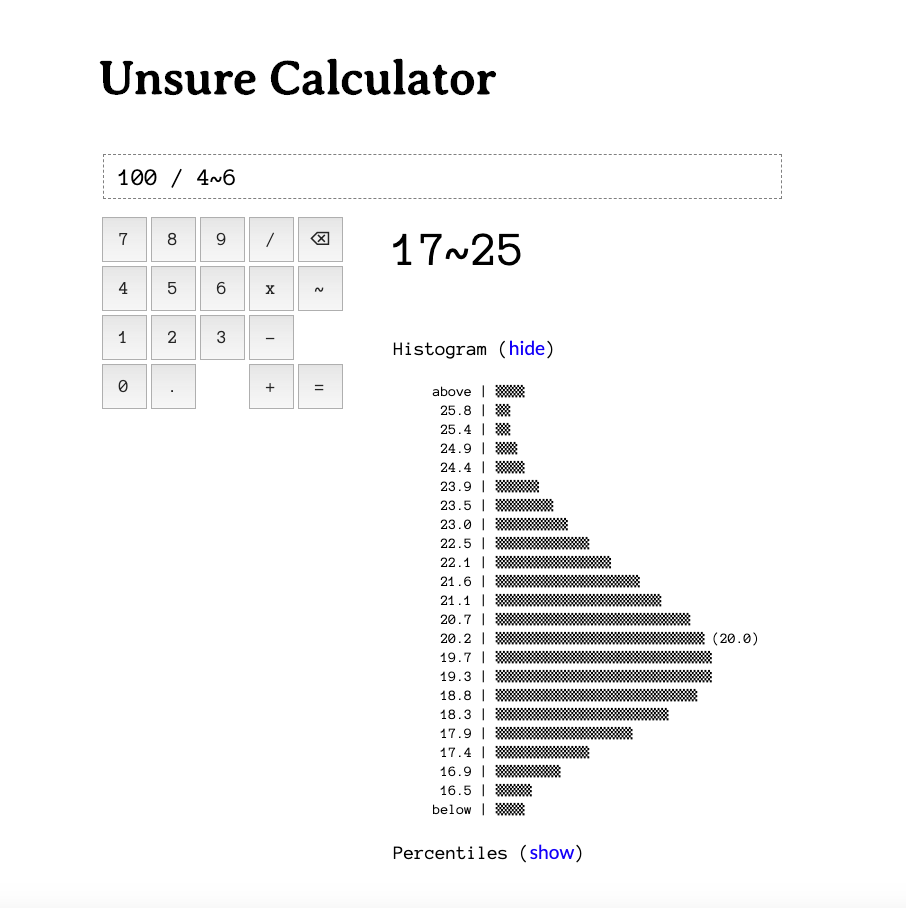
The histogram is neat, I don't think qalc has that. On the other hand, it took 8 seconds to calculate the default (exceedingly trivial) example. Is that JavaScript, or is the server currently very busy?
It's all computed in the browser so yeah, it's JavaScript. Still, 8 seconds is a lot -- I was targeting sub-second computation times (which I find alright).
I actually stumbled upon this a while ago from social media and the web version has a somewhat annoying latency, so I wrote my own version in Python. It uses numpy so it's faster. https://gist.github.com/kccqzy/d3fa7cdb064e03b16acfbefb76645... Thank you filiph for this brilliant idea!
The reason I'm asking: unsure also has a CLI version (which is leaps and bounds faster and in some ways easier to use) but I rarely find myself using it. (Nowadays, I use https://filiph.github.io/napkin/, anyway, but it's still a web app rather than a CLI tool.)
On the whole it seems like a nice idea, but there's a couple of weird things, such as:
> Note: If you're curious why there is a negative number (-5) in the histogram, that's just an inevitable downside of the simplicity of the Unsure Calculator. Without further knowledge, the calculator cannot know that a negative number is impossible (in other words, you can't have -5 civilizations, for example). The input to this was "1.5~3 x 0.9~1.0 x 0.1~0.4 x 0.1~1.0 x 0.1~1.0 x 0.1~0.2 x 304~10000" - every single range was positive, so regardless of what this represents, it should be impossible to get a negative result. I guess this is a consequence of "I am not sure about the exact number here, but I am 95% sure it's somewhere in this range" so it's actually considering values outside of the specified range. In this case, 10% either side of all the ranges is positive except the large "304~10000". Trying with a simpler example: "1~2 x 1~2" produces "1.3~3.4" as a result, even though "1~4" seems more intuitive. I assume this is because the confidence of 1 or 4 is now only 90% if 1~2 was at 95%, but it still feels off. I wonder if the 95% thing actually makes sense, but I'm not especially good at stats, certainly not enough to be sure how viable this kind of calculator is with a tighter range. But just personally, I'd expect "1~2" to mean "I'm obviously not 100% sure, or else I wouldn't be using this calculator, but for this experiment assume that the range is definitely within 1~2, I just don't know where exactly".
The calculator in Emacs has support for what it is you request, which it calls "interval forms". Interval form arithmetic simply means executing the operations in parallel on both ends of the interval.
It also has support for "error forms" which is close to what the calculator in OP uses. That takes a little more sophistication than just performing operations on the lower and upper number in parallel. In particular, the given points don't represent actual endpoints on a distribution, but rather low and high probability events. Things more or less likely than those can happen, it's just rare. > I'm not especially good at stats It shows! All the things you complain about make perfect sense given a little more background knowledge.
Is it actually just doing it at both ends or something nore complex? Because for example if I did 7 - (-1~2)^2 the actual range would be 3-7 but just doing both ends of the interval would give 3-6 as the function is maximised inside the range.
> every single range was positive, so regardless of what this represents, it should be impossible to get a negative result.
They explain that the range you give as input is seen as only being 95% correct, so the calculator adds low-probability values outside of the ranges you specified. I can see how that surprises you, but it's also a defensible design choice.
>The input to this was "1.5~3 x 0.9~1.0 x 0.1~0.4 x 0.1~1.0 x 0.1~1.0 x 0.1~0.2 x 304~10000" - every single range was positive, so regardless of what this represents, it should be impossible to get a negative result.
Every single range here includes positive and negative numbers. To get the correct resulting distribution you have to take into account the entire input distribution. All normal distributions have a non-zero possibility to be negative. If you want to consider only the numbers inside the range you can look at interval arithmetic, but that does not give you a resulting distribution.
This is awesome. I used Causal years ago to do something similar, with perhaps slightly more complex modelling, and it was great. Unfortunately the product was targeted at high paying enterprise customers and seems to have pivoted into finance now, I've been looking for something similar ever since. This probably solves at least, err... 40~60% of my needs ;)
Comments (162) 55 threads
Earlier commentsThe histogram is neat, I don't think qalc has that. On the other hand, it took 8 seconds to calculate the default (exceedingly trivial) example. Is that JavaScript, or is the server currently very busy?
The reason I'm asking: unsure also has a CLI version (which is leaps and bounds faster and in some ways easier to use) but I rarely find myself using it. (Nowadays, I use https://filiph.github.io/napkin/, anyway, but it's still a web app rather than a CLI tool.)
> Note: If you're curious why there is a negative number (-5) in the histogram, that's just an inevitable downside of the simplicity of the Unsure Calculator. Without further knowledge, the calculator cannot know that a negative number is impossible (in other words, you can't have -5 civilizations, for example).
The input to this was "1.5~3 x 0.9~1.0 x 0.1~0.4 x 0.1~1.0 x 0.1~1.0 x 0.1~0.2 x 304~10000" - every single range was positive, so regardless of what this represents, it should be impossible to get a negative result.
I guess this is a consequence of "I am not sure about the exact number here, but I am 95% sure it's somewhere in this range" so it's actually considering values outside of the specified range. In this case, 10% either side of all the ranges is positive except the large "304~10000".
Trying with a simpler example: "1~2 x 1~2" produces "1.3~3.4" as a result, even though "1~4" seems more intuitive. I assume this is because the confidence of 1 or 4 is now only 90% if 1~2 was at 95%, but it still feels off.
I wonder if the 95% thing actually makes sense, but I'm not especially good at stats, certainly not enough to be sure how viable this kind of calculator is with a tighter range. But just personally, I'd expect "1~2" to mean "I'm obviously not 100% sure, or else I wouldn't be using this calculator, but for this experiment assume that the range is definitely within 1~2, I just don't know where exactly".
It also has support for "error forms" which is close to what the calculator in OP uses. That takes a little more sophistication than just performing operations on the lower and upper number in parallel. In particular, the given points don't represent actual endpoints on a distribution, but rather low and high probability events. Things more or less likely than those can happen, it's just rare.
> I'm not especially good at stats
It shows! All the things you complain about make perfect sense given a little more background knowledge.
They explain that the range you give as input is seen as only being 95% correct, so the calculator adds low-probability values outside of the ranges you specified.
I can see how that surprises you, but it's also a defensible design choice.
Every single range here includes positive and negative numbers. To get the correct resulting distribution you have to take into account the entire input distribution. All normal distributions have a non-zero possibility to be negative.
If you want to consider only the numbers inside the range you can look at interval arithmetic, but that does not give you a resulting distribution.
All comments shown.
Couldn't load more comments. Check your connection and try again.