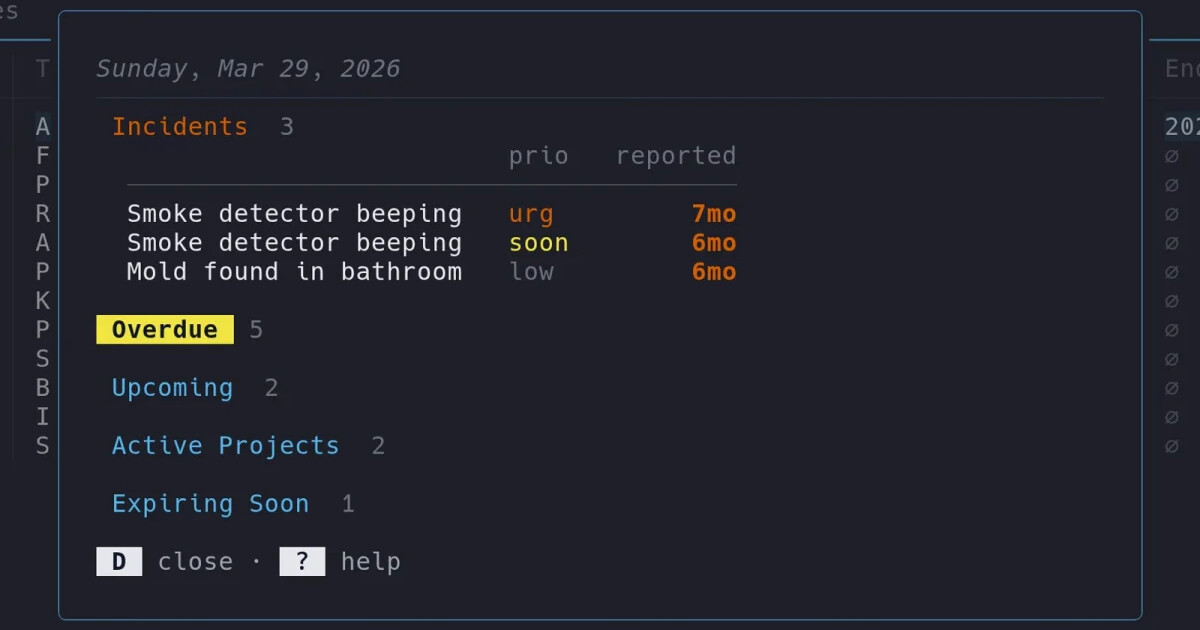
Show HN: Micasa – track your house from the terminal (opens in a new tab)micasa.dev
657 pointsI built it because I was tired of losing track of everything in notes apps, and "I'll remember
that"s. When do I need to clean the dishwasher filter? What's the best quote for a complete
overhaul of the backyard. Oops, found some mold behind the trim, need to address that ASAP. That
sort of stuff.
Another reason I made micasa was to build a (hopefully useful) low-stakes personal project where
the code was written entirely by AI. I still review the code and click the merge button, but 99%
of the programming was done with an agent.
Here are some things I think make it worth checking out:
- Vim-style modal UI. Nav mode to browse, edit mode to change. Multicolumn sort, fuzzy-jump to
columns, pin-and-filter rows, hide columns you don't need, drill into related records (like
quotes for a project). Much of the spirit of the design and some of the actual design choices
is and are inspired by VisiData. You should check that out too.
- Local LLM chat. Definitely a gimmick, but I am trying preempt "Yeah, but does it AI?"-style
conversations. This is an optional feature and you can simply pretend it doesn't exist. All
features work without it.
- Single-file SQLite-based architecture. Document attachments (manuals, receipts, photos) are
stored as BLOBs in the same SQLite database. One file is the whole app state. If you think
this won't scale, you're right. It's pretty damn easy to work with though.
- Pure Go, zero CGO. Built on Charmbracelet for the TUI and GORM + go-sqlite for the database.
Charm makes pretty nice TUIs, and this was my first time using it.
Try it with sample data:
go install github.com/cpcloud/micasa/cmd/micasa@latest && micasa --demo
If you're insane you can also run micasa --demo --years 1000 to generate 1000 years worth of
demo data. Not sure what house would last that long, but hey, you do you.
Comments (218) 83 threads
Show all comments
Showing thread 8 of 83
[1]: https://github.com/home-assistant-ecosystem/home-assistant-c...
[2]: https://developers.home-assistant.io/docs/core/llm/
[3]: https://developers.home-assistant.io/docs/api/rest/
Also I'm really chaotic in terms of schedule. My mood and behaviour changes by the day.
I use it more as a monitoring and control tool.
Not saying your way is bad, it's more as HA is intended. But I'm just saying it won't work for me.
Sometimes I daydream about a "solo mode" where the timings on lights are tighter and my music can follow me around the house when I'm up at night and nobody else is. But most times I'm trying to find the get-out-of-way averages that keep everyone happy.
Some things work great: Automated lights everywhere. Automated dimming of lights at night or sunset or whatever. Notifications when the laundry is done, or the cat litter is ready to be changed, or someone is at the door, or the garage door has been left open - all great. What music to play in what room at any time? Always changes. When to "dim all the lights" because Plex started a movie? But my son is building Legos in the dining room, and my wife is knitting and needs the couch light on. Sometimes I want it, but not every time.
For those things having a single button press is still a huge win over opening multiple apps and getting the right things set the right way for each participant.
HA's automations are getting rather good these days but Nodered is handy for when things get complicated. HA has a very neat Nodered integration maintained by Frenck, who is a HA dev.
My general directive is that any automation that is important should be able to work via manual means. Sadly my (Reolink) doorbell does not currently have a hard wired chime. The previous one (Doorbird) did.
At work, my office has 40 odd windows and I have slapped a zwave sensor on all of them and all doors. Its quite handy to have a blank list of open doors/windows on a panel (HA) next to the alarm panel as you set the alarm. The auto entities card is very useful.