Show HN: boringBar – a taskbar-style dock replacement for macOS (opens in a new tab)boringbar.app
520 pointsI recently switched from a Fedora/GNOME laptop to a MacBook Air. My old setup served me well as a portable workstation, but I’ve started traveling more while working remotely and needed something with similar performance but better battery life. The main thing I missed was a simple taskbar that shows the windows in the current workspace instead of a Dock that mixes everything together.
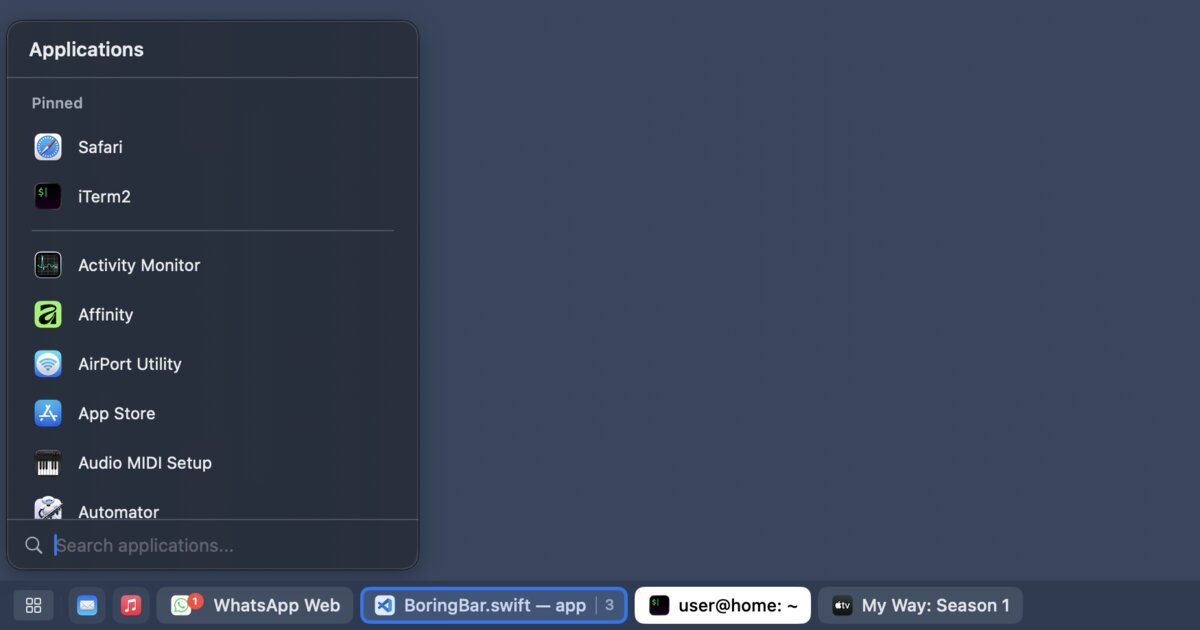
I built boringBar so I would not have to use the Dock. It shows only the windows in the current Space, lets you switch Spaces by scrolling on the bar, and adds a desktop switcher so you can jump directly to any Space. You can also hide the system Dock, pin apps, preview windows with thumbnails, and launch apps from a searchable menu (I keep Spotlight disabled because for some reason it uses a lot of system resources on my machine).
I’ve been dogfooding it for a few months now, and it finally felt polished enough to share.
It’s for people who like macOS but want window management to feel a bit more like GNOME, Windows, or a traditional taskbar. It’s also for people like me who wanted an easier transition to macOS, especially now that Windows feels increasingly user-hostile.
I’d love feedback on the UX, bugs, and whether this solves the same Dock/Spaces pain for anyone else.
P.S. It might also appeal to people who feel nostalgic for the GNOME 2 desktop of yore. I started my Linux journey with it, and boringBar brings back some of that feeling for me.
Comments (308) 131 threads
Show all comments
Showing thread 6 of 131
Over the years, I've tried several of these dock replacement apps. The one that stuck the longest was uBar (which I used with a setup similar to what you have here, emulating a "windows taskbar".
I've hit issues with most of them that forced me to move back to the normal Dock, but the number one issue has always been around notification badges: they always seemed to break in strange ways.
For example, can your dock show badges for iMessage if the app isn't open? Does it get the updated badge count without me opening it? Say I receive a SMS/iMessage, does it instantly show a counter next to the unopened pinned messages app? None of the other apps successfully did this when I tried them...
I don't know if there are other apps like this, but iMessage was by far the biggest offender. Perhaps system settings too?
P.S.: Congrats on the launch :)
P.P.S.: As others have said, I think a subscription for this will rub many people the wrong way (I am one of them). If I'm paying for a subscription, I expect this to be pretty bug-free and have at least monthly updates. I wouldn't ask this of other subscription-based apps, but for one that replaces a system-level component and wants me to keep paying, you bet I am holding it to a high standard! I've wasted too much money on other replacements and gotten very little value out of that.
I expected some pushback on subscriptions, but after trying uBar and running into quite a few issues with it I wanted to build something that feels reliable and polished. I’m pretty much all-in on the Apple ecosystem now, even though I only switched ~6 months ago. My intention is to keep supporting boringBar regularly, as I use it every day myself.
Having failed that, I'd look into trying to inspect (if possible, even we have to disable SIP) the dock itself. Have it do the work for us and read out its badges.
(Throwing random ideas out there, I'm sure you've thought of this)
I think you can get the info from LaunchServices using `lsappinfo` command.
For example, one could have 3 notifications in the Notification Center belonging to Messages, but one could still have 20 unchecked text messaged. Thus, my suggestion wouldn't actually solve the problem.
Though, there may be another database one could check that I am unaware of.