Show HN: boringBar – a taskbar-style dock replacement for macOS (opens in a new tab)boringbar.app
520 pointsI recently switched from a Fedora/GNOME laptop to a MacBook Air. My old setup served me well as a portable workstation, but I’ve started traveling more while working remotely and needed something with similar performance but better battery life. The main thing I missed was a simple taskbar that shows the windows in the current workspace instead of a Dock that mixes everything together.
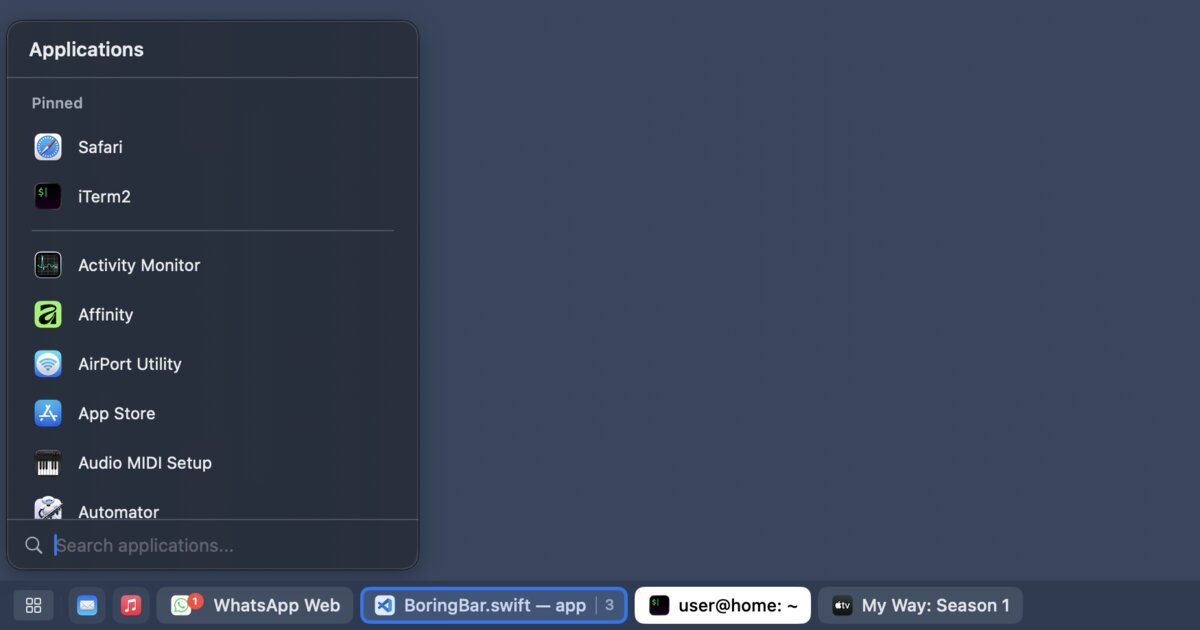
I built boringBar so I would not have to use the Dock. It shows only the windows in the current Space, lets you switch Spaces by scrolling on the bar, and adds a desktop switcher so you can jump directly to any Space. You can also hide the system Dock, pin apps, preview windows with thumbnails, and launch apps from a searchable menu (I keep Spotlight disabled because for some reason it uses a lot of system resources on my machine).
I’ve been dogfooding it for a few months now, and it finally felt polished enough to share.
It’s for people who like macOS but want window management to feel a bit more like GNOME, Windows, or a traditional taskbar. It’s also for people like me who wanted an easier transition to macOS, especially now that Windows feels increasingly user-hostile.
I’d love feedback on the UX, bugs, and whether this solves the same Dock/Spaces pain for anyone else.
P.S. It might also appeal to people who feel nostalgic for the GNOME 2 desktop of yore. I started my Linux journey with it, and boringBar brings back some of that feeling for me.
Comments (308) 131 threads
Show all comments
Showing thread 4 of 131
It’s now $40 for 2 devices and includes 2 years of updates. After that, you can keep using the version you have, or choose to pay for updates again later.
For businesses, I’m keeping the existing annual pricing.
A lot of the comments on pricing were fair, and I appreciate people being direct about it. I still care a lot about long-term maintenance for an app like this, but I think this is a better balance.
edit: yeah this is good stuff. see some other bug reports here im actually not running into any myself, running 4 workspaces plenty of apps. its so straight forward and simple, the design is fantastic. seems to play nicely with my rectangle app snapping, though it takes a moment for it to resize since less bottom space is available with the bar but as long as i can snap im happy.
edit2: just tried ubar then ended up back on this. #1 reason is because your app will resize my window after i snap with rectangle. i couldn't get ubar to do that, ubar also felt a little more sluggish at times. ubar is more feature filled but something about the simplicity here is kind of exactly what i needed to replace the macos dock, and yours is hitting the mark really well.
i think few buttons (don't even need to be text menu items) for logout/restart/shutdown would be pretty clutch, but outside of that i do be digging this a lot. nice. enjoy my moneys!
I didn't want to add the logout/restart/shutdown option initially, but I'll experiment with it to see how useful it is.
For business, I would also pay $20/seat in Apple Business's app store (no quantity discount needed), so it's part of our MDM software for Windows users unfamiliar with Mac. Note that subscriptions are not available to businesses using that channel, only flat purchases. All you have to do is have a flat purchase in the retail app store, and businesses can buy that in bulk to assign to users.
// Your other business licensing mechanisms, like, fixed number of users, different license per batch of users, etc., are too awkward for a real business with real employee turnover to keep track of, sorry.
Regarding business licensing - I know I need to make changes to the fixed number of users limit. The change for it is there but I need some more testing before that gets pushed out.
Apart from that - why do you think the tiered pricing is bad? As you have more users the price per user goes down essentially to ~$1.5 per year at the highest tier.
I have “Displays have separate Spaces” enabled for a few reasons, and I’d like to keep it that way.
I have “Show on all displays” in BoringBar turned off, because if I turn it on, then I lose the per-monitor window on the bar, which I want.
My MBP and First External Display have the opposite windows on their bars. Spotify is open on MBP, but showing on the monitor, and vice versa. The Main display is fine. External Display 2 is my “Main display” and External Display 1 and the MBP display are “Extend display”.
On the extended monitors, BoringBar doesn’t stop windows from going behind it (it auto resizes on the main display) when I maximize them.
I would really like if it had an option like Windows to group windows by application, but not to put them all in one “chip” as you call it. I just want all of my VSCode windows to be next to each other, without another app’s window in between. If I use your “Group windows by app” then I don’t like how hiding and showing from the bar works. In Windows 11, I always show window title and group windows by app.
Lastly, I’d like if all “chips” were the same size, even if some title text is shorter than others.
Great work so far. It feels far less janky than uBar or others I’ve tried. I’m hopeful and will keep an eye on it! Is there any way to reset my trial if you come out with these changes at a later date? For now I’ll be uninstalling it, as the windows on the wrong display is unusable.