Show HN: boringBar – a taskbar-style dock replacement for macOS (opens in a new tab)boringbar.app
520 pointsI recently switched from a Fedora/GNOME laptop to a MacBook Air. My old setup served me well as a portable workstation, but I’ve started traveling more while working remotely and needed something with similar performance but better battery life. The main thing I missed was a simple taskbar that shows the windows in the current workspace instead of a Dock that mixes everything together.
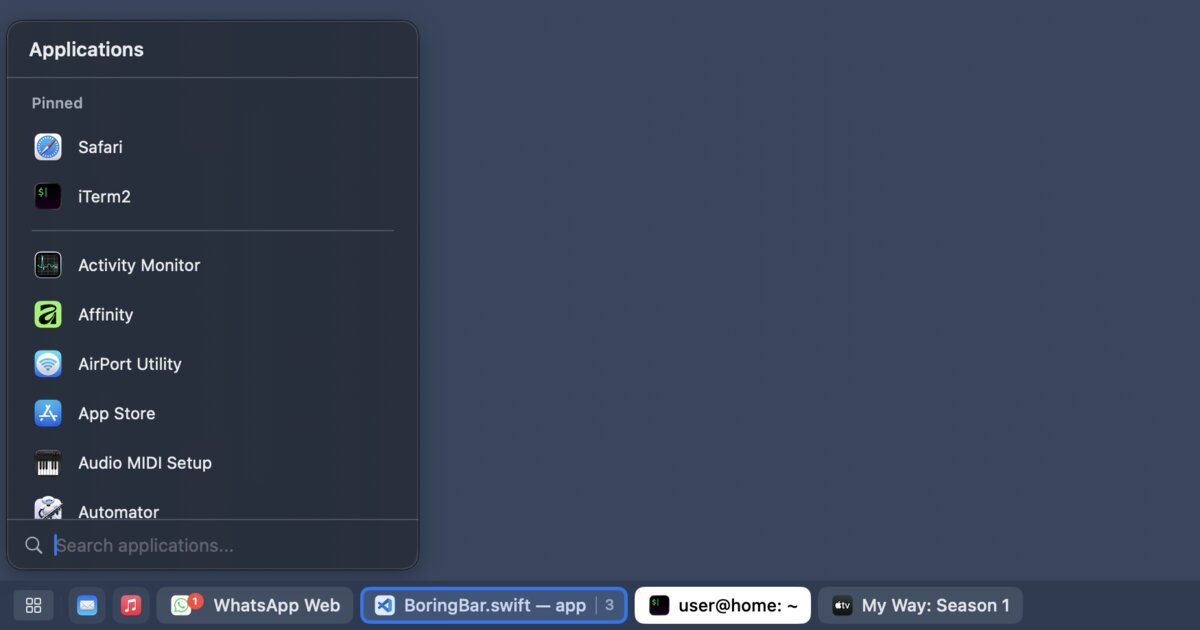
I built boringBar so I would not have to use the Dock. It shows only the windows in the current Space, lets you switch Spaces by scrolling on the bar, and adds a desktop switcher so you can jump directly to any Space. You can also hide the system Dock, pin apps, preview windows with thumbnails, and launch apps from a searchable menu (I keep Spotlight disabled because for some reason it uses a lot of system resources on my machine).
I’ve been dogfooding it for a few months now, and it finally felt polished enough to share.
It’s for people who like macOS but want window management to feel a bit more like GNOME, Windows, or a traditional taskbar. It’s also for people like me who wanted an easier transition to macOS, especially now that Windows feels increasingly user-hostile.
I’d love feedback on the UX, bugs, and whether this solves the same Dock/Spaces pain for anyone else.
P.S. It might also appeal to people who feel nostalgic for the GNOME 2 desktop of yore. I started my Linux journey with it, and boringBar brings back some of that feeling for me.
Comments (308) 131 threads
Show all comments
Showing thread 10 of 131
Granted, it will not integrate with anything hardware-wise by itself (unless there's a package for it - if not, macOS still handles it, and Aqua/Quartz will keep running in the background anyway), but if what you wanted was something that is KDE or GNOME running with its own WM on its own X11 server, doing the exact same thing you'd get if you're running a Linux distro, that's been natively possible for over 15 years.
If a power user loses their power based on what GUI happens to be in front of them, how much of a power user was the power user to begin with?
I'm tend to think of it as a server os with a DE, but as a backend developer I'm probably biased.
To me, GNOME and Pantheon (elementaryOS DE) strongly resemble e.g. iPadOS or Android running on a tablet for a few reasons:
- Chunky heavily padded touch-optimized UI elements (even when no touch capability is present)
- By default, minimize button not present in titlebars
- Near total abandonment of menubars in favor of mobile-style "hamburger" menus
- By default, no desktop icons (not even an app grid!)
- Simplistic ecosystem apps with mobile-like philosophy of eschewing functionality that doesn't fit in toolbars and hamburger menus
- Little to no presence of progressive disclosure (enabling power user functions to be present without falling in the path of novices and tripping them up)
- Limited extensibility and scriptability (more so than macOS in some ways), with what exists (GNOME extensions) being fragile and breaking constantly due to needing to monkeypatch UI code
While it's not my cup of tea, KDE and even less trendy DEs like XFCE do a better job at acting like an actual desktop environment and surfacing the capabilities of the system.
Continue this thread — 2 replies
Also tablet OS? Gnome is keyboard driven with tiling features OOTB...
Being keyboard-driven is nice but doesn't make up for these things, and these days macOS comes with Aero-Snap-like tiling built in too.
[0] https://news.ycombinator.com/item?id=47743939
Maybe that's just what $10 worth of labor looks like in today's economy, though. Times are tough.
/s of course. Just pointing out that your comment is just to flame.