Show HN: boringBar – a taskbar-style dock replacement for macOS (opens in a new tab)boringbar.app
520 pointsI recently switched from a Fedora/GNOME laptop to a MacBook Air. My old setup served me well as a portable workstation, but I’ve started traveling more while working remotely and needed something with similar performance but better battery life. The main thing I missed was a simple taskbar that shows the windows in the current workspace instead of a Dock that mixes everything together.
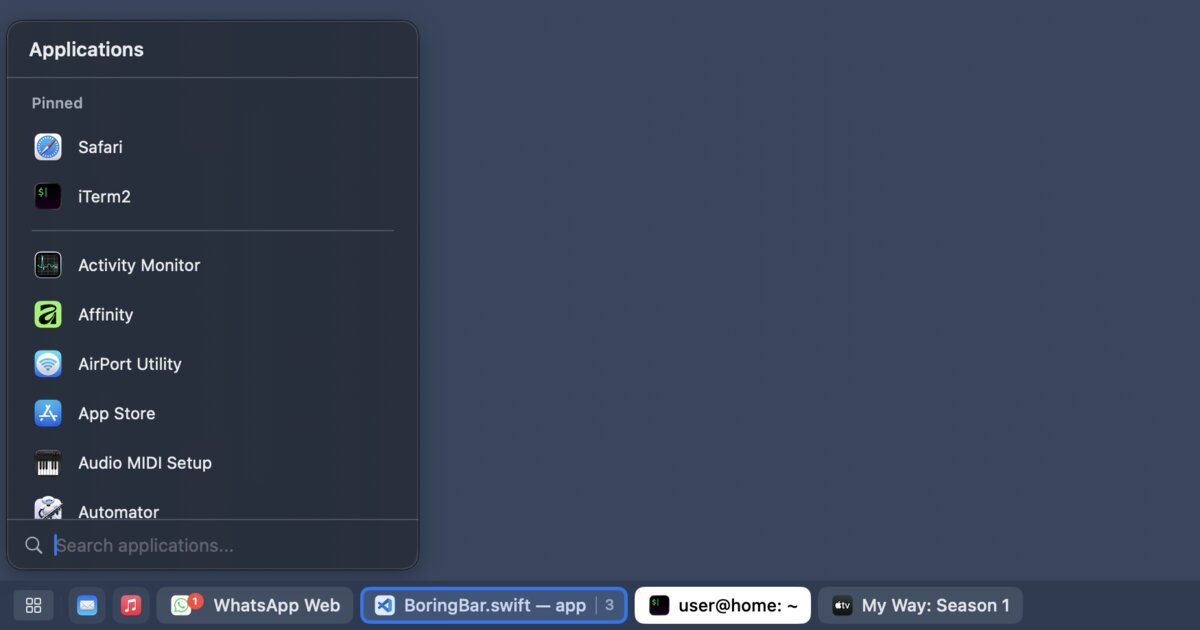
I built boringBar so I would not have to use the Dock. It shows only the windows in the current Space, lets you switch Spaces by scrolling on the bar, and adds a desktop switcher so you can jump directly to any Space. You can also hide the system Dock, pin apps, preview windows with thumbnails, and launch apps from a searchable menu (I keep Spotlight disabled because for some reason it uses a lot of system resources on my machine).
I’ve been dogfooding it for a few months now, and it finally felt polished enough to share.
It’s for people who like macOS but want window management to feel a bit more like GNOME, Windows, or a traditional taskbar. It’s also for people like me who wanted an easier transition to macOS, especially now that Windows feels increasingly user-hostile.
I’d love feedback on the UX, bugs, and whether this solves the same Dock/Spaces pain for anyone else.
P.S. It might also appeal to people who feel nostalgic for the GNOME 2 desktop of yore. I started my Linux journey with it, and boringBar brings back some of that feeling for me.
Comments (308) 131 threads
Show all comments
Showing thread 27 of 131
Some features I'd like:
- XL bar size - even large feels a bit small on a 6K display
- I have grouped windows off, but it would be nice if there was an option to still sort the chips by app, so all the app's windows are listed adjacent to eachother
- If not using the suggest idea above, it would also be nice to be able to drag and drop chips to sort them in the order I want
- Make the Applications menu open for clicks on the entire bottom left area of the screen so I can slam my cursor in the general direction, where it ends up at the bottom left pixel, and click like I could in Windows to open the Start menu
- Ability to give a desktop a name
- Ability to map a key or sequence (e.g. opt, opt) to open the Applications menu, again like how you could open Windows' Start menu with a key
Bugs:
- Clicking a chip to minimise a window, then clicking it again to restore it sometimes causes the window to change size.
- Quitting boringBar spawned three stacks of these: https://postimg.cc/WhmwHGNz even though it already has permissions granted. Clicking "Allow" just spawns another one so they never go away. boringBar is not running in Activity Monitor. Had no choice but to reboot.
- This has been said by another user as well. I am on a 4K monitor - if possible could you share a screenshot of how it looks like currently?
- That's a fair ask. I will take a note of it.
- Drag and drop is something I am working on as well. It will be released in the next version of the app.
- Again, fair. I think I got used to it because I've been using it for a while. But this is being worked on as well and will be released in the next version.
- Ability to give a desktop a name is easy enough. I'll work on this.
- Ability to map a key or sequence for the app menu - you can already do this from the boringBar settings: Just right click on the empty space in the bar and select settings. You can then record a shortcut there.
Regarding the first bug: I do not have a fix for it yet, but I am trying to reproduce it as of now.
I'll try to reproduce the second one as well - this shows up if you are trying thumbnails for the first time - but only just one pop up and not this many.