I love that retro game emulation has spawned this massive culture of super complicated and roundabout ways to replicate $50 consoles. It’s everything I love about DIY projects in general.
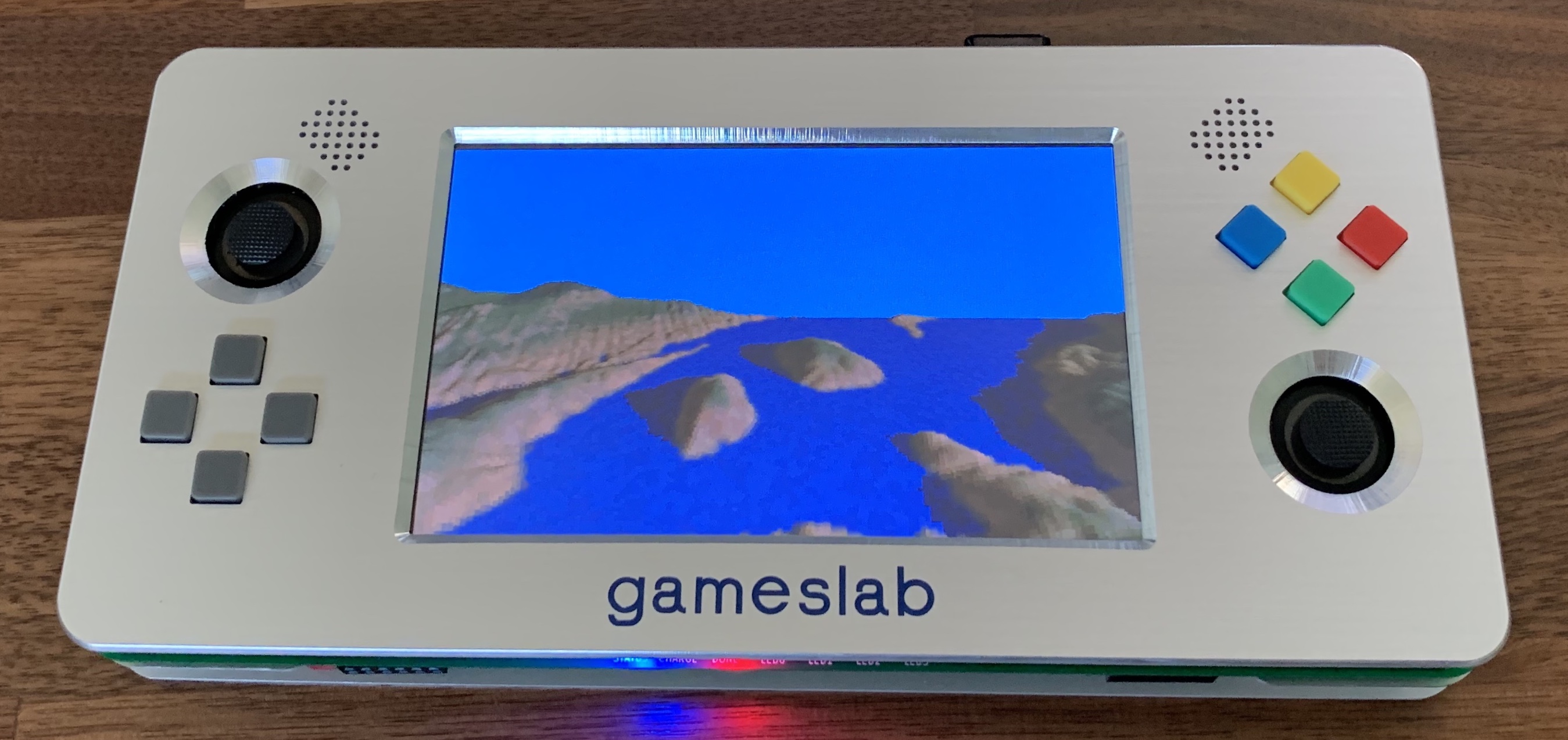
I actually didn't originally intend it to be for retro game emulation, more for experimenting with custom hardware for each game and with 3D acceleration hardware. But, the idea of putting retro emulators in the FPGA fabric is so easy. In fact, over the holidays, I'm working on porting some of the MiSTer FPGA retro emulators to the Gameslab: https://github.com/MiSTer-devel/Main_MiSTer/wiki
This seems Just the sort of thing that I need to make a physical version of my fantasy console.
It's 64k ram 8-bit avr instruction set and a blitter doing a variety of data formats. It's not quite ready for prime-time yet, but you can see some of it online. The virtual hardware registers can be seen at
https://k8.fingswotidun.com/static/docs/io_registers.html It might be quite amenable to something like this.
For those interested in that, Analogue will release the Analogue Pocket, a FGPA handheld console too. It will play Gameboy and Gameboy Advance games and you will be able to develop for it. There will be 1 FGPA to emulate the console and one another for development.
Analogue does great products usually so I can't wait for it. (I'm not affiliated at all with them, I just love their products).
I'm worried the Analogue Pocket will be hard to get. At the bottom of the page[1], it says "Limited quantities will be available". If that means it will be limited like the NT and NT Mini were, that will be very disappointing.
Someone had mentioned Contextual Electronics as a way to learn KiCad, so I got a notification about that. But yes, I also hang out here from time to time :-)
Just mastering Ki-CAD is an accomplishment. I learned circuit design with P-CAD. And it was anything else but intuitive. Playing around with Ki-CAD reminded my of thise days. Can you recommend a good Ki-CAD tutorial? Can you elaborate a little bit on the mistakes you made and what led to the choices you made? E.g. first time read about Das U-Boot.
To be honest, I really don't know a good KiCad tutorial. I kind of just banged myself against it until I learned. But, I had previous experience with Eagle, Altium, and Cadence Allegro. Das U-Boot is the embedded bootloader and is pretty standard for embedded ARM systems (and others! https://github.com/u-boot/u-boot/tree/master/arch). On a dev-board prototype before, I had also used Buildroot (https://buildroot.org) to create the minimal root filesystem image. This time around, I decided to use Debian since it makes installing packages I want much easier. For example, I can just apt-get install the USB wifi firmware packages instead of hunting them down and including in a manually generated image. It's still using a custom compiled kernel though, since I have custom drivers for things like the graphics hardware. I'm trying to use Rust for as much as possible (I like Rust a lot). The STM32L0 runs rust, I bodged together a framebuffer driver in Rust, and the games in userspace are also in Rust. I'll post about the Rust framebuffer driver at some point.
Yeah, Rust is great! I've used it on several production projects for work, but not for extensive embedded work before this. Embedded Rust is getting better and better!
KiCad isn’t that hard. There is one tool for schematic entry and another for layout. The most confusing thing for me was part and their footprint management. I ended creating myParts libraries for my own parts in each project. KiCad 5 is really great software with lots of examples.
Can you simulate/calculate how voltages and signals behave in Ki-CAD or do you need pen and paper or an entirely different tool to achieve that? What does the entire workflow look like, not jut the circuit layout design?
Comments (50) 19 threads
I love that retro game emulation has spawned this massive culture of super complicated and roundabout ways to replicate $50 consoles. It’s everything I love about DIY projects in general.
I actually didn't originally intend it to be for retro game emulation, more for experimenting with custom hardware for each game and with 3D acceleration hardware. But, the idea of putting retro emulators in the FPGA fabric is so easy.
In fact, over the holidays, I'm working on porting some of the MiSTer FPGA retro emulators to the Gameslab: https://github.com/MiSTer-devel/Main_MiSTer/wiki
It's 64k ram 8-bit avr instruction set and a blitter doing a variety of data formats. It's not quite ready for prime-time yet, but you can see some of it online. The virtual hardware registers can be seen at https://k8.fingswotidun.com/static/docs/io_registers.html It might be quite amenable to something like this.
Continue this thread — 1 reply
Analogue does great products usually so I can't wait for it.
(I'm not affiliated at all with them, I just love their products).
[1] https://www.analogue.co/pocket/
You're slowly becoming a software guy after all...
Just mastering Ki-CAD is an accomplishment. I learned circuit design with P-CAD. And it was anything else but intuitive. Playing around with Ki-CAD reminded my of thise days.
Can you recommend a good Ki-CAD tutorial?
Can you elaborate a little bit on the mistakes you made and what led to the choices you made? E.g. first time read about Das U-Boot.
To be honest, I really don't know a good KiCad tutorial. I kind of just banged myself against it until I learned. But, I had previous experience with Eagle, Altium, and Cadence Allegro.
Das U-Boot is the embedded bootloader and is pretty standard for embedded ARM systems (and others! https://github.com/u-boot/u-boot/tree/master/arch).
On a dev-board prototype before, I had also used Buildroot (https://buildroot.org) to create the minimal root filesystem image. This time around, I decided to use Debian since it makes installing packages I want much easier. For example, I can just apt-get install the USB wifi firmware packages instead of hunting them down and including in a manually generated image. It's still using a custom compiled kernel though, since I have custom drivers for things like the graphics hardware.
I'm trying to use Rust for as much as possible (I like Rust a lot). The STM32L0 runs rust, I bodged together a framebuffer driver in Rust, and the games in userspace are also in Rust. I'll post about the Rust framebuffer driver at some point.
Shout out to the Real Time For the Masses project (it's an RTOS) I used: https://github.com/rtfm-rs/cortex-m-rtfm
P.S: I'm the ultimate noob on these topics.
[1] https://en.wikipedia.org/wiki/SPICE
https://www.youtube.com/watch?v=vaCVh2SAZY4
(first video of a series of 10)
All comments shown.
Couldn't load more comments. Check your connection and try again.