I recently came across a couple of institutions which required me to print, sign and send back a couple of documents. COVID and all of that means I don't have a printer at home. I made this website by inspiration from other posts here and now it's free to use! Code is open source so feel free to comment any new ideas or things you would like includede!
I usually sign documents on my iPad but in this case they told me the signature had to be from a pen. COVID and everything means I don't have a printer nor a scanner at home so I developed this to "scan my iPad signed documents" worked like a charm!
It's interesting that the problem they had was with the signature. You can very easily make a handwritten signature on an iPad. I don't see how there's any practical way to tell the difference between a high-quality, handwritten signature done on an iPad with either a finger or an Apple Pencil and a scanned signature done with a pen. Are you sure that's not just some excuse they gave you?
Banks that need monthly financials to assure regulators that they are servicing their loans are also required to justify the documents to the regulator. If you just autogenerated it perhaps they’re wrong or falsified. While if you have to take out a pen and sign them that won’t happen.
That's beyond absurd. The content of the document is what determines whether it's falsified or not, and you can inspect the content for inconsistencies on a generated PDF far more easily than a scanned one.
But scanning these documents defeats the point. The law isn't saying "it must be signed with wet ink, but after that a scanned copy is sufficient", it says you need the actual paper with the wet ink signature.
> If you’re a solicitor responsible for registration, you need the other parties' solicitors, on closing, to send you the wet-ink signed parts of the documents. You’ll only proceed when you have the wet-ink signed documents, not when you have seen electronic images of them.
it occurs to me that you could do this with a lower tech method, just sign your name on a piece of scotch tape and align the tape on the monitor over the document, take a photo with your phone and then use that as the 'scanned image' in the pdf file.
> COVID and all of that means I don't have a printer at home.
I recently felt privileged enough to get a printer at home in the workroom of my 2bd apartment in San Francisco. And yet, it ran out of toner! The notaries wanted documents already printed! The print shops are all closed! What the deuce! I got one to sympathize with me, she wouldn't take my flash drive, but ran out of excuses when I said I have the files on my iphone's file section and could email them.
I had the same issue recently. What I did is sign a blank paper, take a pic of it with my phone and copypasted the text over the blank page with The Gimp.
I used to do that, but nowadays I tend to sign things on iPad. When using the stylus it looks exactly like it was hand signed (even without the stylus, I can just zoom way in and make it look kinda hand signed). The pdf is of course not scanned looking, but nobody had complained yet.
I am fairly close to various expat communities in my city. "Where can I print this document" is a very common question. It also affects tourists who need printed tickets that are only available a few days before their flight.
Comments (168) 45 threads
Show all comments
Showing thread 3 of 45
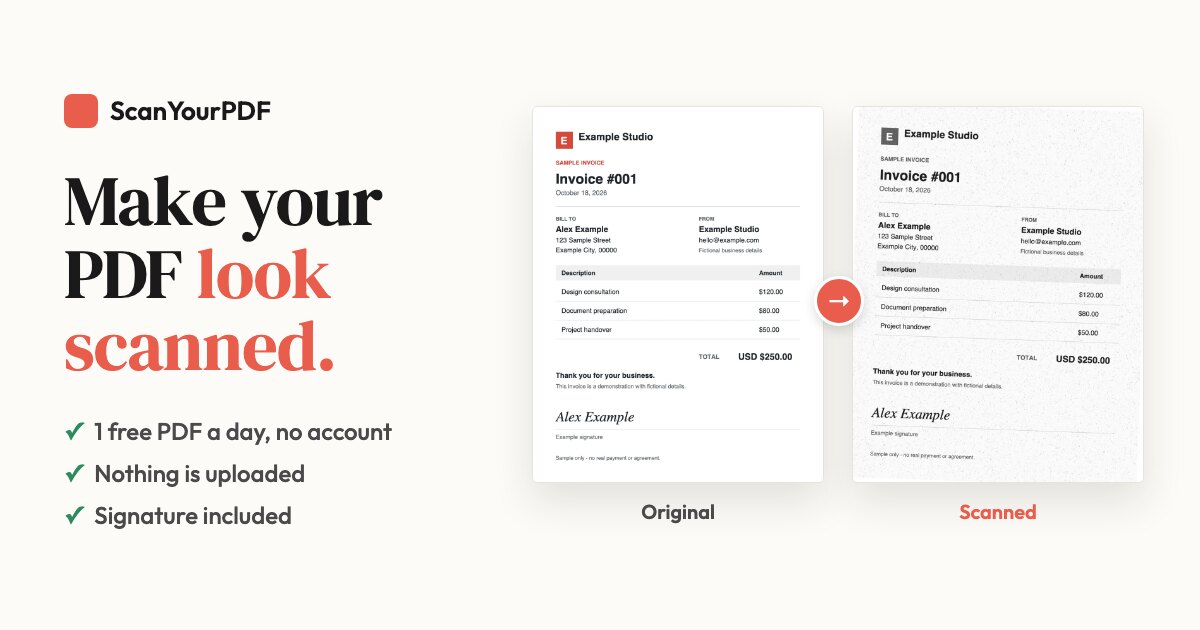
One suggestion: add thumbnail/preview of how docs will look like after "scanned". Or maybe even a "Before and After" teaser! :)
It's interesting that the problem they had was with the signature. You can very easily make a handwritten signature on an iPad. I don't see how there's any practical way to tell the difference between a high-quality, handwritten signature done on an iPad with either a finger or an Apple Pencil and a scanned signature done with a pen.
Are you sure that's not just some excuse they gave you?
Continue this thread — 2 replies
Continue this thread — 1 reply
Yes, absurd.
Continue this thread — 5 replies
Continue this thread — 1 reply
> If you’re a solicitor responsible for registration, you need the other parties' solicitors, on closing, to send you the wet-ink signed parts of the documents. You’ll only proceed when you have the wet-ink signed documents, not when you have seen electronic images of them.
As others noted a before and after pic would be great.
Just tried this. Orienting your phone at 45 degrees to the monitor can mostly reduce them, but that's not really that useful.
[1]https://en.wikipedia.org/wiki/Moir%C3%A9_pattern
I recently felt privileged enough to get a printer at home in the workroom of my 2bd apartment in San Francisco.
And yet, it ran out of toner! The notaries wanted documents already printed! The print shops are all closed! What the deuce!
I got one to sympathize with me, she wouldn't take my flash drive, but ran out of excuses when I said I have the files on my iphone's file section and could email them.