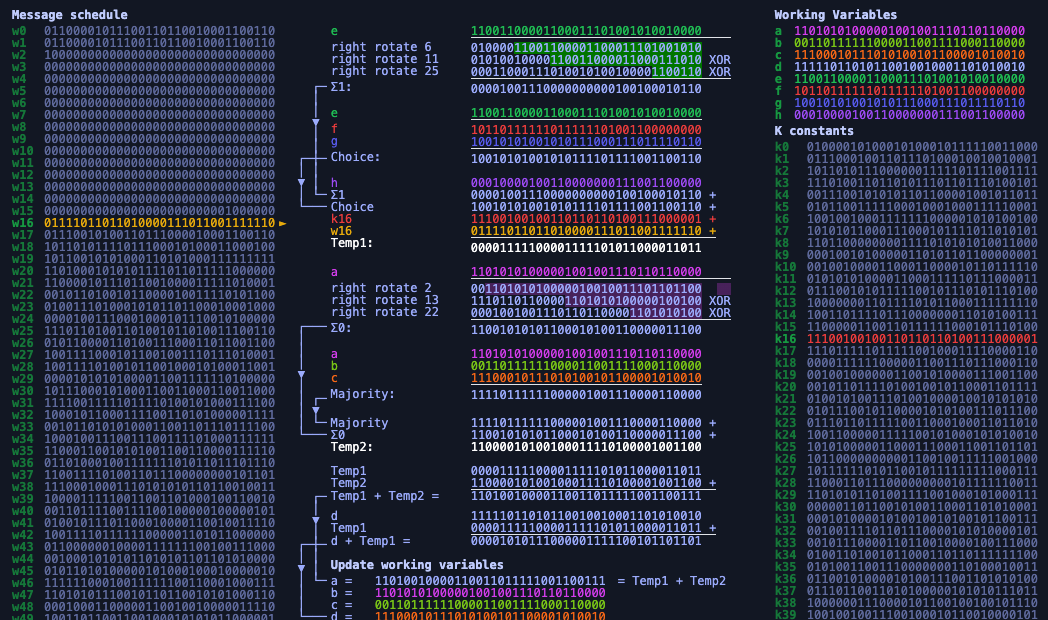
Thanks :) I first implemented sha256 in js to understand its inner workings. Then I started displaying its variables with react and adding this stepped mechanism. Finally, I added some notes on the left to add some context of what is going on.
Very nice. Have you built any other algorithm visualizations? I have a very strong interest in how algorithms are visualized so that they are more easily understood.
First time doing this type of visualizations. I have this one tailwind.ink which will visualize a color palette on their luminance, chroma and hue values, but it's not really representing the algorithm behind.
I love single-purpose websites like this that put a potentially complex implementation behind an elegantly simple interface. This website’s design and styling are pretty too :) Another useful one is https://www.h-schmidt.net/FloatConverter/IEEE754.html . I’d say even https://godbolt.org/ counts!
Comments (137) 40 threads
Earlier commentshttps://rosettacode.org/wiki/SHA-256
Hashcat's GPU-optimized OpenCL implementation: https://github.com/hashcat/hashcat/blob/master/OpenCL/inc_ha...
Bitcoin's CPU-optimized sha256.cpp, sha256_avx2.cpp, sha256_sse4.cpp, sha256_sse41.cpp: https://github.com/bitcoin/bitcoin/blob/master/src/crypto/sh...
https://github.com/topics/sha256 https://github.com/topics/sha-256
Cryptographic_hash_function#Cryptographic_hash_algorithms: https://en.wikipedia.org/wiki/Cryptographic_hash_function#Cr...
Merkle–Damgård construction: https://en.m.wikipedia.org/wiki/Merkle%E2%80%93Damg%C3%A5rd_...
(... https://rosettacode.org/wiki/SHA-256_Merkle_tree ... Merkleized IAVL+ tree that is balanced with rotations in order to optimize lookup,: https://github.com/cosmos/iavl
Self-balancing binary search tree: https://en.wikipedia.org/wiki/Self-balancing_binary_search_t... )
All comments shown.
Couldn't load more comments. Check your connection and try again.