Show HN: TikZ Editor – WYSIWYG editor for figures in LaTeX (opens in a new tab)tikz.dev
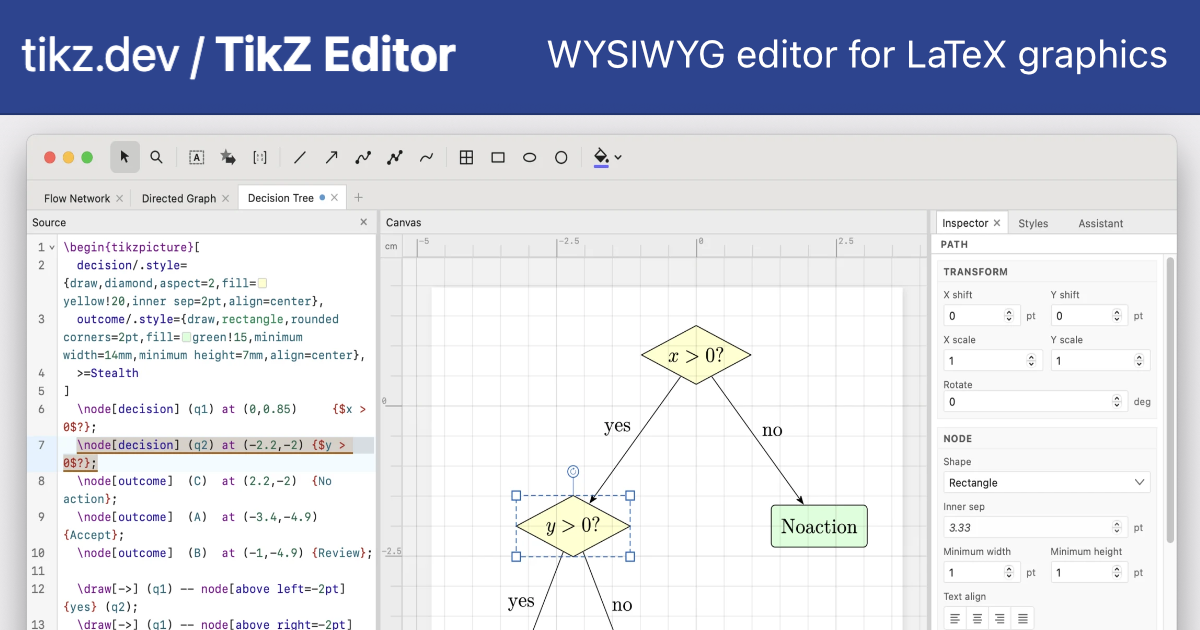
451 pointsI built an open-source WYSIWYG TikZ editor (available for web and desktop) that allows you to edit your TikZ source code visually by dragging and resizing elements. It simultaneously shows the source code and the rendered figure, and lets you edit either one while the two views stay in sync. I’m not aware of any other editors that are simultaneously source editors and WYSIWYG (even for editing SVG or HTML), and I’m quite pleased with how well the combination works.
The way the app is implemented is by parsing the TikZ code, and at all times keeping track of the exact source location of each object. Thereby, when a user drags an element to a new position, the app can override just the numbers in the coordinate without changing anything else in the code (such as line breaks or indentation).
This approach essentially required reimplementing a large fraction of TikZ, which is the kind of task that no human would ever want to do. I think building software that doesn’t exist yet because it would be impossibly tedious to code up is one of the great new possibilities thanks to coding agents, and it’s worth brainstorming for other examples. (This app was built almost entirely by Codex.)
Implementing the app came with lots of fun side quests, including building converters from SVG / pptx / ipe to TikZ, re-implementing the LaTeX hyphenation and line-breaking algorithm to support multi-line nodes, and making a color picker that uses the red!20!black color mixing notation used in LaTeX papers.
Comments (74) 48 threads
Earlier commentsBut, I've taken my papers to Typst. Could you have the agent do the same thing for Cetz, the TikZ equivalent for Typst?
The best thing I have found so far is tylax (https://github.com/scipenai/tylax), which I think is a parser with rules, not a statistical model.
I'm looking to write a paper on a recent project, but most of the places I've seen to submit has asked for TeX. I greatly prefer Typst because of the ridiculously fast compilation times but I haven't used it for anything outside of school assignments do to that restriction.
xfig ?
Still, I would really like to know how you approached this from an architecture perspective. I'm also curious to how much coding agents structured the code like so by themselves or if you had to steer them heavily (I've just tried a bit gemini flash from antigravity cli so I'm a bit behind on this).
Also how did you approach the rendering correspondence with actual tikz code? Do you have some tests that like render the tikz using latex and your js pipeline and compare the result for differences?
Indeed I have scripts for compiling a given tikz figure using latex (in particular dvisvgm so I get an SVG instead of a PDF) as well as my js-based renderer. I apply that script to various corpuses, mostly particular pages from the tikz manual (see https://tikz.dev), but there are also a few books about TikZ that have downloadable zips of all the examples they use. I then inspect the correspondence between the two renderers by eye and give Codex a list of which figures are wrong and why, and it then goes and fixes the underlying issues.
You'd think that finding discrepancies between the renderers could be done automatically, but it hasn't worked well in my experience. The models are multimodal but still kinda blind; they think two pictures are the same even if they are very much not the same. But once you tell them whats wrong, they're then pretty good at iterating until it is fixed. (One could also try to do a pixel diff of rasterized images, but that's super noisy, and text rendering isn't going to be pixel perfect anyway.)
The world thanks you.
All comments shown.
Couldn't load more comments. Check your connection and try again.