Show HN: TikZ Editor – WYSIWYG editor for figures in LaTeX (opens in a new tab)tikz.dev
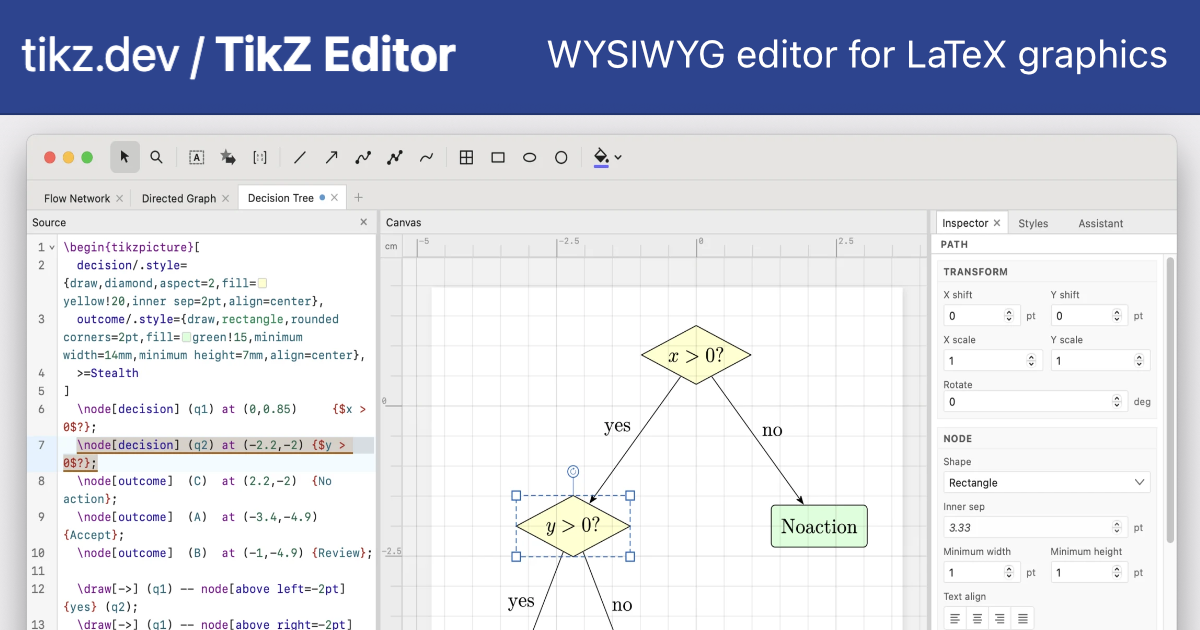
451 pointsI built an open-source WYSIWYG TikZ editor (available for web and desktop) that allows you to edit your TikZ source code visually by dragging and resizing elements. It simultaneously shows the source code and the rendered figure, and lets you edit either one while the two views stay in sync. I’m not aware of any other editors that are simultaneously source editors and WYSIWYG (even for editing SVG or HTML), and I’m quite pleased with how well the combination works.
The way the app is implemented is by parsing the TikZ code, and at all times keeping track of the exact source location of each object. Thereby, when a user drags an element to a new position, the app can override just the numbers in the coordinate without changing anything else in the code (such as line breaks or indentation).
This approach essentially required reimplementing a large fraction of TikZ, which is the kind of task that no human would ever want to do. I think building software that doesn’t exist yet because it would be impossibly tedious to code up is one of the great new possibilities thanks to coding agents, and it’s worth brainstorming for other examples. (This app was built almost entirely by Codex.)
Implementing the app came with lots of fun side quests, including building converters from SVG / pptx / ipe to TikZ, re-implementing the LaTeX hyphenation and line-breaking algorithm to support multi-line nodes, and making a color picker that uses the red!20!black color mixing notation used in LaTeX papers.
Comments (74) 48 threads
Show all comments
Showing thread 13 of 48
But, I've taken my papers to Typst. Could you have the agent do the same thing for Cetz, the TikZ equivalent for Typst?
The best thing I have found so far is tylax (https://github.com/scipenai/tylax), which I think is a parser with rules, not a statistical model.
I'm looking to write a paper on a recent project, but most of the places I've seen to submit has asked for TeX. I greatly prefer Typst because of the ridiculously fast compilation times but I haven't used it for anything outside of school assignments do to that restriction.
xfig ?